


SAP records every transaction. What it doesn’t do is act on them. The payment remittance sitting in an inbox, the overdue invoice nobody has chased, the batch job that failed silently at 2am: these are the repetitive tasks that eat analyst hours across every SAP-running enterprise. According to a 2024 Deloitte survey, finance professionals spend over 50% of their working hours on data gathering and validation alone. That’s not a skills problem. It’s a tooling gap.
Key Takeaways
- SAP alone doesn’t close the execution gap: it records what happened, but relies on external tools to act on it
- RPA tools (UiPath, Power Automate) handle screen-level task automation well; AI-native platforms handle document understanding, semantic matching, and multi-system execution
- The right tool depends entirely on the process layer: finance O2C needs different capabilities than IT operations or batch job scheduling
- Implementation speed varies from days (Power Automate lightweight flows) to 18-24 months (SAP native AI modules); most enterprise tools fall in the 4-16 week range
- Total cost of ownership includes template maintenance, admin overhead, and retraining costs that don’t appear in license pricing
In This Article
- Key Takeaways
- How Did We Evaluate These Tools?
- The 7 Best Tools for Automating Repetitive SAP ERP Tasks
- How Do You Choose the Right SAP Automation Tool?
- Take Action: Match the Tool to the Process
What Is SAP ERP Task Automation?
SAP ERP task automation is the use of software to execute repetitive, rule-based, or document-heavy SAP processes without manual intervention. This spans robotic process automation (RPA) bots that replay human actions on SAP GUI screens, low-code workflow engines that orchestrate multi-step approvals, AI-native platforms that read unstructured documents and post results directly to SAP, and workload automation tools that schedule and manage SAP batch jobs across complex system landscapes.
How Did We Evaluate These Tools?
Not all SAP automation tools are equivalent, and the differences matter more than the marketing suggests. The tools below were assessed against six criteria:
- Native SAP integration depth: Does it connect directly to S/4HANA, ECC, BTP, or related systems without custom middleware?
- Configuration requirement: Can finance or operations teams set up automations without writing code, or does every change depend on a developer?
- Document and AI capability: Does it process unstructured inputs (PDFs, emails, multi-format documents), or only clean structured SAP data?
- Implementation timeline: How long before the first automation runs in production and delivers real value?
- Use case specificity: Is it purpose-built for a particular process (cash application, job scheduling) or a horizontal toolkit that needs heavy configuration?
- Total cost of ownership: License cost plus the hidden costs of template maintenance, bot upkeep, admin overhead, and retraining when underlying documents or layouts change.
The 7 Best Tools for Automating Repetitive SAP ERP Tasks

1. Transformance: Best for AR and O2C Finance Automation in SAP Environments
Transformance is an AI-native execution layer for order-to-cash processes. It sits between SAP (or Oracle, NetSuite, or Dynamics) and the finance team, handling what ERPs were never designed to do: reading messy payment documents, matching incoming cash to open invoices, investigating deductions, and following up on overdue accounts autonomously.
The platform covers four products: ClearMatch for cash application, ClaimIQ for deductions and claims management, CollectPulse for collections and dunning, and CashPulse for AR-driven cash forecasting. Vero, the cross-product AI agent, runs these processes and surfaces exceptions to the human team with full context and a recommended next action.
The core technical difference versus standard SAP automation tools is document understanding. Instead of OCR and regex templates that require weeks of configuration per remittance format, ClearMatch uses vision language models that understand document layout, tables, and context natively. DocSense, the extraction engine, achieves 94.9% accuracy across document types and 99.7% on structured remittance data, without template configuration. New customer formats are handled on first contact.
Match rates start at approximately 85% at deployment and improve to 95%+ within 90 days as MemoryMesh, the platform’s persistent memory system, accumulates customer payment patterns, past resolutions, and exception-handling logic. That improvement is automatic: no retraining, no consulting engagement.
For collections, CollectPulse’s autonomous AI calling agent contacts overdue accounts in 70+ languages, captures promise-to-pay dates and dispute reasons, and writes outcomes back to the system automatically. That’s 15-20 calls per hour versus 15-20 calls per day for a human collector. For shared service centers running cross-border AR, that language coverage alone reshapes the staffing model.
If your team is dealing with high document volumes and manual matching cycles, exploring how agentic AI handles cash application from remittance to GL posting shows what the execution layer actually looks like in practice.
Full rollout takes 4-8 weeks. First payments are matched in days.
Pros:
- VLM-based document extraction: 99.7% accuracy on structured remittances, zero template configuration, new formats handled on first contact
- Persistent institutional memory (MemoryMesh) that improves match rates automatically within 90 days
- Autonomous multilingual collection calls in 70+ languages
- DSO reduction of 8-15 days within 90 days of deployment
- Deploys inside the customer’s own VPC: financial data never crosses a trust boundary
- 4-8 week full implementation, no dedicated admin required
Cons:
- Focused on O2C only: not a broader financial close suite or treasury management system
- Optimized for enterprise document complexity (hundreds to thousands of documents per day): not designed for high-volume e-commerce with millions of daily microtransactions
Best for: Mid-market and large enterprises (€500M-€25B+ revenue) running SAP, Oracle, or Dynamics with unstructured upstream payment data. Particularly strong for FMCG, chemicals, MedTech, and manufacturing companies with shared service centers handling cross-border AR.
Pricing: Module-based pricing tied to users, transaction volume, and AI usage. 25-30% more affordable than incumbent platforms, with significantly faster onboarding that reduces total project cost. Pilots available.

2. SAP Build Process Automation: Best Native SAP Workflow Engine
SAP Build Process Automation (formerly SAP Workflow Management combined with SAP Intelligent RPA) is SAP’s own low-code/no-code platform, running on the SAP Business Technology Platform (BTP). It combines workflow orchestration, RPA bots, process visibility, and decision management in one environment, without requiring third-party middleware or custom API connectors.
The native integration is its clearest advantage. It reads and writes SAP data directly. IT teams don’t need to build custom adapters for standard SAP process automation, and the governance model is tightly aligned with existing SAP licensing and security frameworks.
The tradeoff is scope. SAP Build Process Automation works well for SAP-native, structured data workflows: approval chains, procurement processes, HR tasks, and financial period management. It is not designed to process unstructured external documents like PDF remittances or trade deduction memos. For those scenarios, the platform requires custom BTP development that adds months and cost.
Best for: Organizations standardized on SAP BTP that need to automate approval workflows, procurement processes, or HR tasks without adding third-party tools or external RPA licenses.
Pricing: Consumption-based on BTP credits. Costs scale with automation volume and vary significantly based on existing SAP licensing agreements.
3. UiPath: Best RPA Platform for SAP GUI Automation
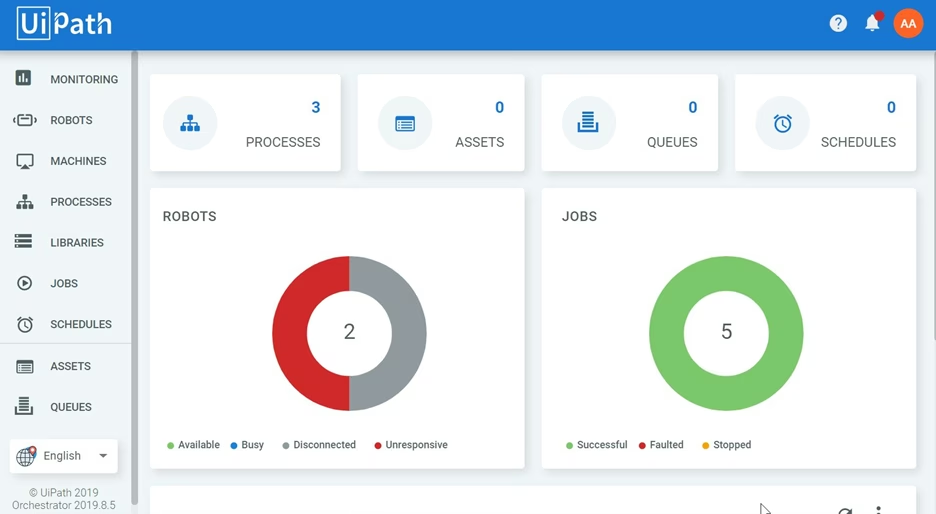
UiPath is the market-leading robotic process automation platform with a pre-built library of SAP GUI activities, computer vision for legacy SAP screens, and orchestration for multi-step, multi-application processes. It can automate almost any repetitive SAP transaction a human performs on screen: GL posting, user provisioning, report generation, and cross-system data transfers between SAP and Excel, email, or web portals.
The practical limitation is maintenance. RPA bots that interact with SAP screens break when SAP layouts change, when transaction formats shift, or when new document types are introduced. One analysis of RPA programs in European enterprises found that organizations spend 30-40% of their total RPA program budget on bot maintenance rather than net-new automation. That ratio compounds over time.
UiPath has added AI document processing capabilities (Document Understanding) to handle unstructured inputs. These are separate modules with distinct pricing and their own configuration overhead, meaning the platform’s full capability for document-heavy processes carries significantly higher TCO than the base RPA license implies.
Best for: IT and operations teams that need to automate a wide variety of SAP transactions quickly and across multiple SAP versions, without waiting for native SAP development capacity.
Pricing: UiPath Pro starts at approximately $420/month for one unattended and one attended bot. Enterprise pricing is negotiated per volume. Hidden costs: Document Understanding modules, Orchestrator infrastructure, and ongoing bot maintenance add substantially to the base license.
4. Celonis: Best for Process Mining and Execution Management
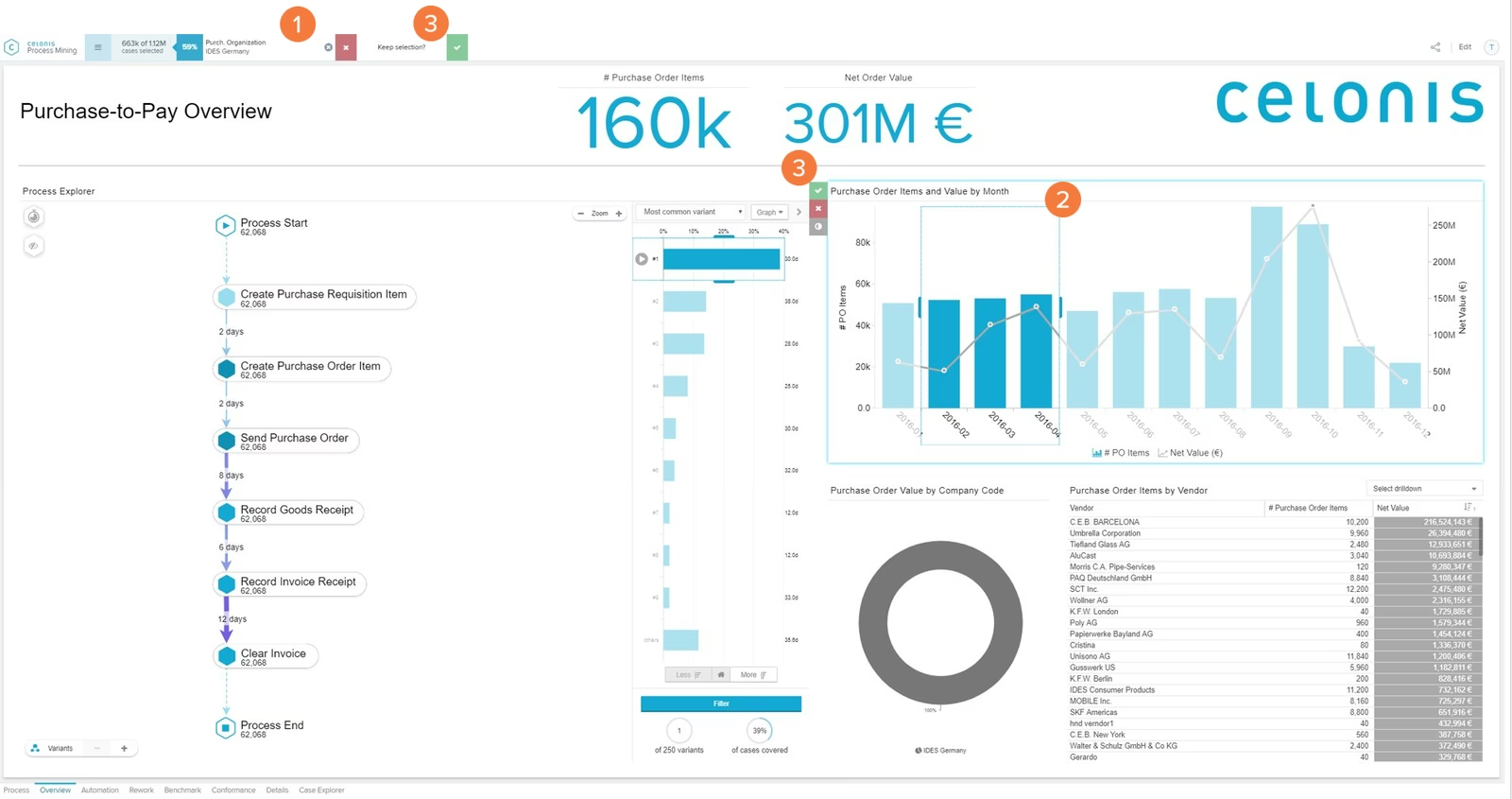
Celonis started as a process mining platform. It connects to SAP event logs, reconstructs the actual execution path of every process (purchase order, invoice, collections follow-up), and identifies where bottlenecks, rework, and deviations occur. For large enterprises that don’t know where to start with automation, this diagnostic function is genuinely valuable.
The platform has expanded into execution management: when a process deviation is detected, Celonis can surface an alert and initiate an escalation workflow. If an invoice is aging past its SLA, the system can trigger a follow-up or escalation without waiting for a manual review.
Celonis is strongest as a diagnostic tool. It tells you where your SAP processes are breaking and why. The execution layer is improving but remains weaker than purpose-built automation tools for specific process areas. For cash application or collections throughput, a dedicated platform will outperform Celonis on accuracy and straight-through rate. For enterprise-wide process optimization across procurement, finance, and supply chain simultaneously, Celonis has no direct equivalent.
Best for: Large enterprises that need to audit SAP process performance across multiple functions before deciding where to invest in automation. A logical first step before committing to execution tools.
Pricing: Enterprise SaaS pricing, typically $250,000+ annually for mid-to-large enterprise deployments. Celonis does not publish list prices.
5. ServiceNow for SAP: Best for IT Operations and Change Management Workflows
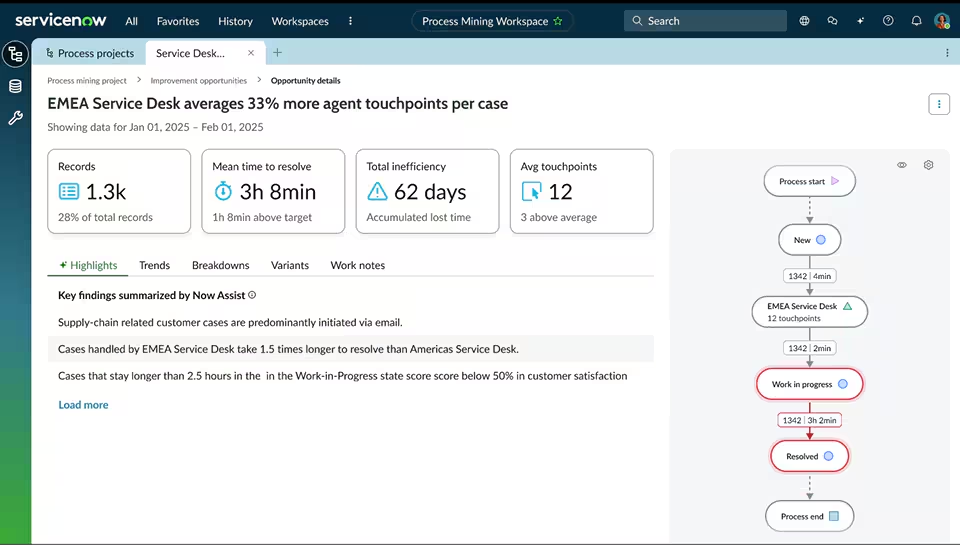
ServiceNow connects to SAP environments through its ITSM and BPA modules. Pre-built SAP connectors handle automated incident management, change request workflows, system monitoring alerts, and user access provisioning across SAP landscapes.
For IT operations teams managing SAP environments, ServiceNow reduces the manual work of incident triage, change approvals, and system health monitoring. Its workflow automation handles multi-step IT processes that cross multiple teams and approval layers, with a strong audit trail and SLA enforcement.
ServiceNow is not designed for finance-side SAP automation: it doesn’t process payment documents, run collections, investigate deductions, or post to AR. Its value is on the IT operations side, keeping the SAP environment running reliably and routing IT work efficiently.
Best for: IT departments managing SAP S/4HANA or ECC landscapes who need to reduce manual incident handling, automate change management workflows, and monitor system health without building custom tooling.
Pricing: Module-based enterprise licensing. Typical SAP ITSM implementations start at $150,000-$300,000 annually depending on module scope and seat count.

6. Microsoft Power Automate: Best Lightweight Integration for Microsoft Environments
Power Automate is the right tool for low-complexity, high-frequency automations that connect SAP to the Microsoft stack. Pre-built SAP ERP connectors allow basic read and write operations, and the platform integrates natively with Teams, SharePoint, Outlook, and Excel.
For SAP automations involving Microsoft applications, Power Automate is fast to configure and affordable relative to enterprise RPA platforms. For anything requiring deep SAP process logic, document understanding, or high-volume transactional processing, it hits practical limits quickly.
The connector-based architecture means Power Automate is dependent on what SAP exposes through its APIs. For organizations running older SAP ECC versions with limited API coverage, the usable automation scope narrows further, and exceptions end up back in the manual queue.
Best for: Teams already in the Microsoft 365 environment who want to automate simple SAP data lookups, notifications, or approval triggers without deploying a full RPA program.
Pricing: Basic tier included in Microsoft 365 plans. Premium connectors (including SAP ERP) require Power Automate Premium at approximately $15 per user per month, plus per-flow licensing for certain automation scenarios.

7. Redwood RunMyJobs: Best for SAP Workload Automation and Batch Job Scheduling
Redwood RunMyJobs is a cloud-native workload automation platform built specifically for enterprise SAP environments. It orchestrates SAP batch jobs, integrates with S/4HANA, RISE with SAP, and BTP, and manages the scheduling complexity of large SAP landscapes: job dependencies, SLA monitoring, failure alerting, and restart logic.
For organizations running hundreds or thousands of daily SAP batch jobs (payroll runs, MRP planning, financial period close jobs, report generation), manual job monitoring is a significant operational drain. RunMyJobs automates the scheduling layer: pre-conditions, job dependencies, failure handling, and escalation, without a human watching the job log overnight.
Redwood is the only SAP-endorsed workload automation app, with deep certification coverage across S/4HANA Cloud, RISE with SAP, and BTP. Its 2025 addition of AI-powered observability (Redwood Insights) adds proactive anomaly detection on top of the core scheduling engine, flagging jobs at risk of SLA breach before they fail.
Best for: SAP Basis teams and IT operations centers managing complex batch landscapes across S/4HANA, ECC, or BTP who need reliable, auditable job orchestration without manual monitoring overhead.
Pricing: Subscription-based enterprise pricing, typically $100,000-$250,000 annually for large SAP environments. Redwood offers pilots and modular entry points.
How Do You Choose the Right SAP Automation Tool?
The right tool depends on which repetitive processes cost you the most time. A few questions narrow the options quickly.
- What type of process are you automating? Finance processes with unstructured upstream documents (remittances, deduction memos, multi-format invoices) need AI-native document understanding, not a screen-scraping bot. IT operations processes (incident management, job scheduling) need tools purpose-built for that layer. Conflating these two categories is the most common reason SAP automation projects underdeliver.
- Where does the data start? If the process starts with a clean, structured SAP transaction (an approval, a PO, a system event), RPA or native BTP tools are efficient. If the process starts with a PDF in an inbox or an email attachment, the automation needs to understand that document before it can act on it. According to McKinsey, companies using AI-driven automation in ERP environments report a 25% increase in productivity and a 30% reduction in manual data handling time. That improvement only materializes when the tool matches the complexity of the task.
- What is your real total cost of ownership? License pricing is the visible number. The hidden costs are bot maintenance (how often do SAP layouts or document formats change?), admin overhead (do you need a dedicated team to manage the platform?), and retraining cost when the underlying process evolves. Traditional RPA programs in enterprise environments often spend 30-40% of their total program budget on maintenance rather than net-new automation. AI-native platforms that handle new formats on first contact carry far lower ongoing maintenance burden.
- What are your implementation constraints? An 18-24 month SAP Cash Application implementation versus a 4-8 week deployment is not a marginal difference. For a finance team losing analyst hours today, implementation speed is a financial decision, not just an IT preference.
For teams specifically focused on understanding the full order-to-cash process before choosing automation tools, mapping the process first clarifies where the real bottlenecks live. And if deductions management is a specific pain point, that’s a use case where general-purpose RPA typically fails, and purpose-built investigation tooling makes a measurable difference.
If your SAP environment is also contributing to a difficult month-end close, the root cause is often upstream AR data quality rather than the close process itself. Automating AR first frequently makes the close faster as a second-order effect.
Book a free demo with Transformance if your finance team runs on SAP and is still manually processing remittances, chasing deductions across spreadsheets, or covering only a fraction of overdue invoices each week.
Frequently Asked Questions
What is the best tool for automating repetitive SAP ERP tasks in 2026?
The best tool depends on the process layer. For finance and O2C automation (cash application, collections, deductions), purpose-built AI-native platforms deliver higher accuracy and lower maintenance cost than general RPA. For native SAP workflow orchestration, SAP Build Process Automation is the most tightly integrated option. For broad SAP GUI task automation, UiPath is the market leader.
Can SAP automate repetitive tasks without third-party tools?
SAP provides native automation through BTP (SAP Build Process Automation) and Joule, its AI assistant. These work well for structured, SAP-native data workflows. For unstructured upstream inputs, like PDF remittances, trade deduction memos, or email-based payment information, native SAP modules require significant custom BTP development before they can process the data, adding time and cost.
What is the difference between RPA and AI automation for SAP?
RPA automates repetitive tasks by recording and replaying human actions on SAP screens. It works well for structured, predictable interactions but breaks when layouts, formats, or document types change. AI automation goes deeper: it understands documents natively, learns from patterns over time, and handles the exceptions that RPA routes to a human queue. For document-heavy finance processes, AI automation delivers higher straight-through processing rates with significantly lower ongoing maintenance.
How long does it take to implement an SAP automation tool?
Implementation timelines range from days (Power Automate for lightweight integrations) to 18-24 months (SAP Cash Application to full production value). Most enterprise-grade tools fall in the 4-16 week range for initial deployment. Redwood RunMyJobs and Transformance typically deploy in 4-8 weeks. Celonis takes 8-20 weeks depending on data integration scope. SAP native modules require the longest timelines.
Which SAP tasks have the highest ROI when automated?
The highest-ROI candidates combine high volume, rule-based logic, and document complexity: cash application and payment matching, collections follow-up and dunning, deduction identification and investigation, batch job scheduling, purchase order and invoice approval workflows, and financial period close jobs. According to McKinsey, companies automating these processes report a 30% reduction in time spent on manual data tasks and a 25% productivity improvement across finance teams.
What is the total cost of ownership for SAP automation tools?
Total cost of ownership includes license fees, implementation and integration costs, ongoing bot or template maintenance, admin staffing, and retraining costs when SAP layouts or document formats change. For traditional RPA in complex document environments, maintenance can consume 30-40% of the total program budget annually. AI-native platforms with dynamic document understanding carry lower maintenance overhead because they adapt to new formats without reconfiguration. The Gartner 2024 RPA market report noted the market reached $3.8 billion in revenue, with highest satisfaction scores among organizations that matched tool type to process complexity.
Does SAP automation work with both S/4HANA and older ECC systems?
Yes, most major tools support both. UiPath automates SAP GUI regardless of version, including ECC 6.0 and older releases. SAP Build Process Automation targets S/4HANA and BTP primarily. Redwood RunMyJobs has native S/4HANA and ECC connectors. Transformance connects via standard ERP connectors and supports S/4HANA, ECC, Oracle, NetSuite, and Microsoft Dynamics.
Take Action: Match the Tool to the Process
The best SAP automation investment is not the broadest platform. It’s the one that directly eliminates your highest-cost repetitive process.
For finance teams running SAP with unstructured payment data, overdue collections, or growing deduction backlogs, the gap between what the ERP records and what actually gets done is the problem worth solving first. General-purpose RPA closes some of that gap. AI-native platforms built specifically for O2C processes close most of it, faster, with lower maintenance overhead.
Request a personalized demo to see how the Transformance O2C execution layer runs on your SAP data. Full rollout in 4-8 weeks. First payments matched in days.
Sources
- Top SAP Automation Tools Revolutionizing ERP in 2025 | SELECCIÓN Consulting
- Why SAP is recognized in the Gartner® Magic Quadrant™ for Robotic Process Automation | SAP
- The State of Enterprise AI Adoption in 2025 | WalkMe
- Processes and Automation: 2025 Trends in SAP | Precisely
- AI Automation Platforms vs Traditional RPA: Total Cost Comparison (2026) | Lleverage
- RPA Software Cost Comparison (2025) | Radium AI
- RunMyJobs by Redwood on SAP Store | SAP
- Future-Proofing SAP Workload Automation with RunMyJobs | SAPinsider
- McKinsey & SAP | McKinsey & Company
- UiPath Plans and Pricing | UiPath


