



Cash application in SAP clears bank statement items against open invoices in S/4HANA and ECC. SAP Cash Application is SAP's machine learning offering for S/4HANA. Some finance teams also run a document and approval layer alongside it. This guide explains what SAP provides, what to add with AI, and how to integrate it with S/4HANA and ECC.
Key Takeaways
- SAP Cash Application is SAP's machine learning offering for S/4HANA that matches bank statement items to open invoices and clears matches above a configurable confidence threshold
- According to Gartner, 59% of finance leaders reported using AI in their finance function in 2025 (survey of 183 CFOs and senior finance leaders)
- According to credit insurer Atradius, nearly four in five companies report late payments (Payment Practices Barometer, 2026)
- Transformance DocSense reads remittances with over 97% extraction accuracy across 100+ document types and no templates; ClearMatch auto-matches 95% of payments, runs end to end in under 8 minutes and validates 100% of postings before anything reaches SAP (Transformance platform data, 2026)
In This Article
- Key Takeaways
- What Is SAP Cash Application?
- Why Does SAP Cash Application Matter for Enterprise Finance?
- How Does SAP Cash Application Work?
- What Can You Add to SAP Cash Application?
- How Does AI Extend SAP Cash Application?
- How to Integrate AI with SAP Cash Application
- How to Evaluate Solutions That Extend SAP Cash Application
- A Worked Example: From Remittance Email to SAP Posting
- Frequently Asked Questions
- How to Get Started with SAP Cash Application Automation
What Is SAP Cash Application?
SAP Cash Application is SAP's machine learning offering for SAP S/4HANA that automates the matching of incoming bank statement items to open customer invoices in accounts receivable. It generates confidence-scored matching proposals, clears matches above a configurable threshold automatically, and routes lower-confidence items to an AR workqueue for human review. SAP also offers payment advice extraction as part of SAP Cash Application; check which remittance formats and channels your configuration covers.
The model trains on historical clearing decisions and learns to associate payment characteristics with specific invoice matches. Proposals above a configurable confidence threshold clear automatically, proposals between the thresholds appear in a review workqueue, and items below the minimum are treated as unmatched. (SAP Learning describes the mechanism.)
Cash application sits within the broader order-to-cash cycle alongside collections, deductions management and cash forecasting. For the full cycle, see What is Order-to-Cash and 10 AI Use Cases.
Why Does SAP Cash Application Matter for Enterprise Finance?
Every day a payment sits unposted, your AR balance looks inflated, your collections team may chase customers who have already paid, and your cash forecast is less reliable. At scale, that is a working capital topic, not a back-office detail.
The external picture explains the pressure. According to credit insurer Atradius, nearly four in five companies report late payments, and trade credit makes up 52% of their B2B transactions (Payment Practices Barometer, 2026). The more payments arrive late, partially or with deductions, the more the speed and accuracy of cash application matter. At the same time, Gartner found that 59% of finance leaders used AI in their finance function in 2025, so AI in finance is now a mainstream choice.
For SAP customers, the native module is embedded in the platform they already run and does not require a new vendor relationship. SAP describes SAP Cash Application as a way to reduce accounts receivable matching effort (SAP use case page). Teams that also want to handle remittance documents, deductions and approval steps can run a layer alongside it.
How Does SAP Cash Application Work?
The process follows a defined sequence. Understanding each step shows where SAP's native capabilities do their work and where additional automation can plug in.

Step 1: Bank Statement Ingestion
SAP ingests bank statements in supported formats from connected banking partners. For each incoming line item, the system captures the amount, value date, reference fields and any available payment detail.
Customers' remittance advices usually contain the invoice numbers, line-item breakdowns and deduction codes. See remittance advice for the basics.
Step 2: Machine Learning Match Proposals
The machine learning engine compares bank line items against open AR items. Using patterns learned from historical clearing decisions, it assigns a confidence score to each proposed match. Three outcomes are possible:
- Auto-clear: Confidence above the threshold. The payment clears automatically.
- Propose for review: Confidence between the minimum and the auto-clear threshold. Routed to the AR workqueue.
- No proposal: Below the minimum confidence. Treated as an exception.
Step 3: Exception Handling
Items without a confident match land in the AR workqueue. An analyst opens each one, finds the correct invoice and posts it.
Step 4: GL Posting
Once matched, SAP clears the open item and posts the journal entry to the general ledger. SAP FI is the system of record for clearing and posting, which is why added automation is designed to feed it and never to bypass it.
What Can You Add to SAP Cash Application?
SAP remains the system of record for clearing and posting. Teams that work alongside it typically look at three areas:
- Remittance documents: read PDFs, emails and portal exports and turn them into structured data before matching.
- Deductions and short payments: investigate why a customer paid less and route the case to the right workflow.
- Posting validation and approvals: preview and approve every entry before it reaches SAP FI.
Common Cash Application Complexity: Remittance Formats, Partial Payments and Deductions
In any ERP landscape, cash application involves remittance formats that differ by customer, payments that cover only part of an invoice, and deductions that need a cause. Teams can add support for each of these alongside the ERP.
Remittance Documents
In B2B commerce, the matching detail often arrives as a PDF attached to a payment email, a customer portal download in a proprietary layout, or a spreadsheet with deduction codes in a column of its own. Transformance DocSense reads these documents with vision language models rather than OCR plus regex, with over 97% extraction accuracy across 100+ document types and 170+ languages and zero template configuration. New formats are read on the first attempt.
Deductions and Short Payments
When a customer pays less than the invoice amount, the cause may be a trade promotion, a pricing dispute, a shortage claim or a duplicate invoice. Answering that question means cross-referencing promotional agreements, delivery records and correspondence. Transformance ClaimIQ identifies deductions with 97% accuracy, in under 15 seconds per deduction (manual review: about 45 minutes), classifies them into six categories and validates about 40% of trade deductions automatically by rules. ClaimIQ recovers revenue that would otherwise be lost to invalid deductions. See What is Deductions Management? and automating partial payments and deductions.
Posting Validation and Approvals
Transformance ClearMatch checks every proposed journal entry against configurable rules before it reaches SAP: debit/credit balance, GL account validation, required fields and entity-specific posting rules. Finance teams see a preview with pass/fail indicators and approve. 100% of postings are validated and nothing posts without human sign-off.
| Layer | What it does | Where it runs |
|---|---|---|
| Matching, clearing and SAP's payment advice extraction | Machine learning match proposals and clearing in SAP | SAP Cash Application in SAP S/4HANA |
| Remittance documents | Reads PDFs, emails and portal exports in any format with over 97% extraction accuracy and no templates | Transformance DocSense |
| Remittance-line matching and preparation before SAP | Maps extracted remittance lines to open items; 95% auto-match rate, end to end in under 8 minutes | Transformance ClearMatch |
| Short payments and deductions | Identifies and classifies deductions into six categories, under 15 seconds per deduction | Transformance ClaimIQ |
| Additional validation and approval | 100% posting validation; nothing posts without human sign-off | Transformance (posting validation) |
| General ledger posting | System of record for clearing and GL posting | SAP S/4HANA or SAP ECC |
How Does AI Extend SAP Cash Application?
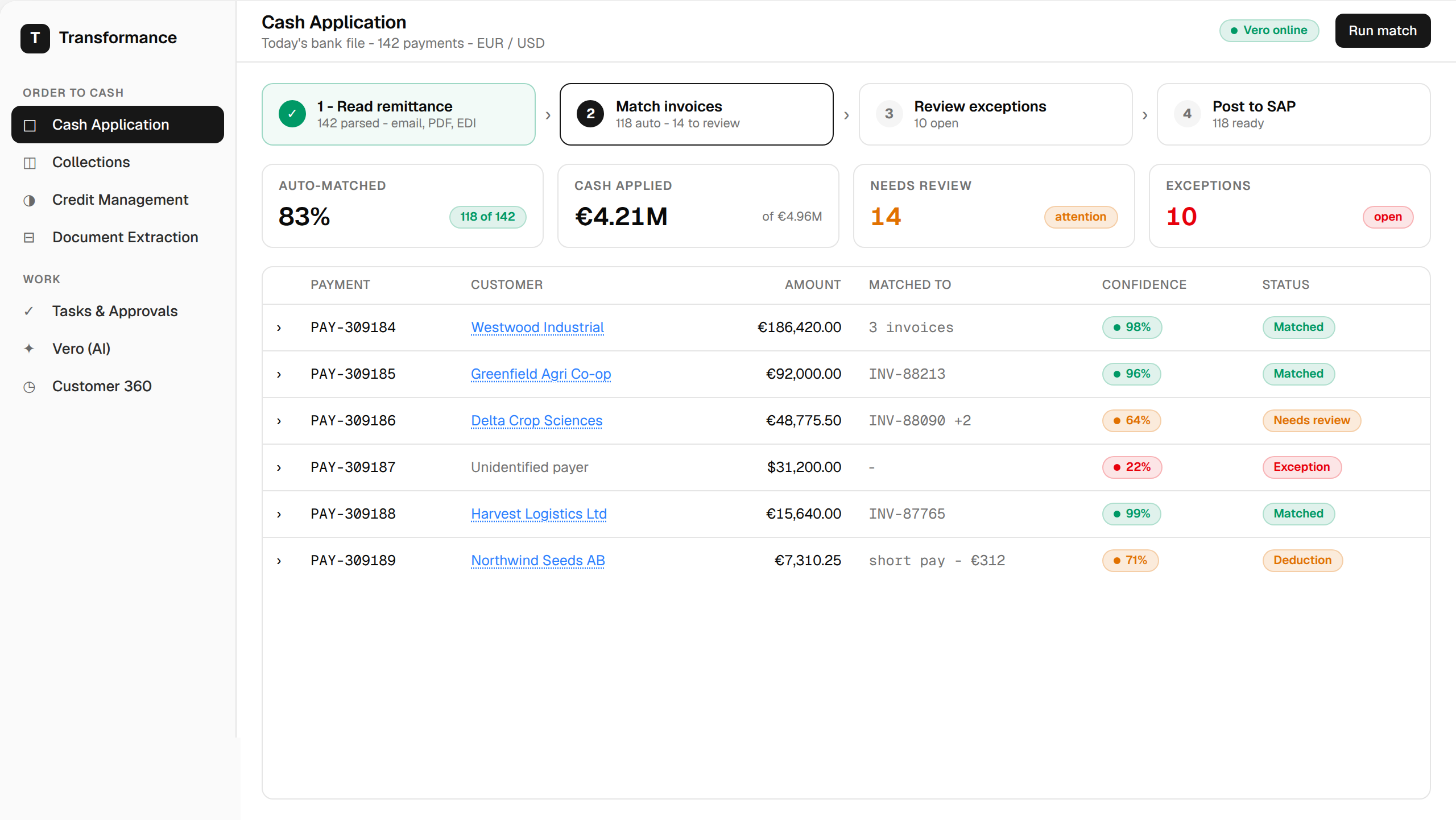
Transformance reads the documents that carry the payment detail and validates every entry before it posts to SAP.
Vision Language Models vs. OCR

Template-based OCR reads characters and applies rules, so it works when a document matches a known template and needs a new template when a customer changes the layout. Vision language models (VLMs) read documents differently: they understand layout, tables, context and intent. Transformance DocSense was built from day one on vision language models, reaching over 97% extraction accuracy with no template setup. When a customer sends a remittance in a format the system has not seen before, it is read on the first attempt.
Customer 360 as Working Memory
Resolving a payment often depends on context: why a customer's abbreviated reference maps to a specific invoice batch, why one retailer always includes net deductions in a particular line, why a seasonal payment arrives split across two bank items. Vero, the Transformance agent, works on Customer 360, one graph per customer that serves as its working memory, and applies that context to the next payment from the same customer. Because that context lives in Customer 360, it stays available when team members change.
Auto-Match and Human Sign-Off
ClearMatch combines deterministic rules, machine learning pattern matching and an AI agent working on Customer 360 to reach a 95% auto-match rate, and runs end to end in under 8 minutes. It follows a 4-level approval model (read, recommend, execute, post), with a human in the loop for every ERP posting. Analysts work only the items that need a judgment call, under the same posting controls.
How to Integrate AI with SAP Cash Application
The integration pattern keeps SAP as the system of record. Transformance works as an execution layer next to SAP: it extends SAP rather than replacing it. The AI layer reads open items, prepares the match and writes the approved result back.
- Read open items. The layer reads open AR items from SAP through APIs or a batch extract.
- Ingest payment data. Bank statements, remittance emails, portal exports and PDFs enter through DocSense.
- Match and classify. ClearMatch proposes the matches and ClaimIQ classifies short payments.
- Validate and approve. Entries are validated, previewed and signed off by a person.
- Post to SAP FI. Cleared items and validated journal entries are written back to SAP.
Transformance connects to SAP S/4HANA and ECC, as well as Oracle, NetSuite and Microsoft Dynamics. Deployment can run in the customer's own cloud (VPC), with SSO/SAML, role-based access control and a full audit trail. It also runs in Microsoft Teams, so analysts can approve without switching tools.
Transformance goes live alongside SAP in up to 4-8 weeks for a full rollout. First payments are matched in days, with no template training, and a proof of value on one entity takes 4-5 weeks.
If you are planning an ECC migration, the same layer can run before and after the move. See the SAP ECC end-of-maintenance playbook for AR for planning guidance.
How to Evaluate Solutions That Extend SAP Cash Application
Whether you are activating SAP's native module, extending it with an additional layer, or reviewing your current setup, these seven criteria help you compare options:
- Remittance document handling. Does the solution process PDFs, email attachments and portal downloads, and in how many formats and languages?
- Accuracy on new formats. Ask for extraction accuracy and what happens when a customer changes a layout.
- Exception context. When a payment does not match, does the analyst see context, a recommended action and the supporting documents?
- Posting integrity. Are journal entries validated before they reach SAP? Does the approval workflow satisfy your internal controls?
- Deductions integration. Does a short payment route to a deduction workflow?
- Deployment timeline. When are the first payments matched in production, and what does full rollout require?
- ERP and security fit. Which SAP editions does it connect to, and can it run in your cloud with SSO and an audit trail?
For a wider checklist, see How Do AR Teams Evaluate Cash Application Automation Vendors? and the cash application software buyer's guide.
A Worked Example: From Remittance Email to SAP Posting
To see Transformance cash application in action, take the tour:
The following scenario is illustrative, not customer data. A large retail customer wires $847,200. The bank statement shows the amount and a payment reference, "INV-BATCH-Q1". The customer separately emails a PDF remittance with 23 invoice lines, 4 partial payment adjustments and 3 deduction lines coded "promotional allowance".
- DocSense reads the emailed PDF and extracts all 23 invoice lines, with no template for this customer.
- ClearMatch maps the lines to open items in SAP and resolves the 4 partial payments using the customer's history in Customer 360.
- ClaimIQ identifies the 3 deduction lines and classifies them for the deduction workflow.
- Posting validation checks the journal entries before anything posts.
- The analyst reviews a short summary of the 2 items that need a judgment call and signs off. SAP FI clears the open items and posts the entries.
The result: the full payment is matched to its invoices and the deductions are routed. ClearMatch runs the match end to end in under 8 minutes; the analyst reviews only the 2 items that need judgment and signs off the same day.
Frequently Asked Questions
What is SAP cash application?
SAP Cash Application is SAP's machine learning offering for SAP S/4HANA that matches incoming bank statement items to open customer invoices in accounts receivable. It generates confidence-scored match proposals, clears matches above a configurable threshold automatically, and routes the remaining items to an AR workqueue for human review.
How does machine learning work in SAP cash application?
SAP Cash Application uses machine learning trained on historical clearing decisions to score each proposed payment-to-invoice match. Matches above a configurable confidence threshold clear automatically, proposals between the thresholds go to the workqueue for review, and items below the minimum are treated as unmatched. The model keeps learning from the clearing decisions your team makes.
Which remittance formats can Transformance read for an SAP team?
Whatever your SAP setup, Transformance DocSense reads remittance documents (PDFs, emails, portal exports and spreadsheets) in any format with over 97% extraction accuracy and no templates, and hands structured lines to the match.
How long does it take to add an AI layer to SAP cash application?
Transformance goes live alongside SAP in up to 4-8 weeks for a full rollout. First payments are matched in days, with no template training, and a proof of value on one entity takes 4-5 weeks.
How does an execution layer for AR automation integrate with SAP?
An execution layer for AR automation connects to SAP through APIs or batch extracts: it reads open items, matches payments, and writes cleared items and validated journal entries back to SAP FI after approval. Transformance connects to SAP S/4HANA and ECC, as well as Oracle, NetSuite and Microsoft Dynamics, and can be deployed in the customer's own cloud (VPC) with SSO/SAML, role-based access and a full audit trail.
What is the difference between SAP cash application and third-party AR automation?
SAP Cash Application matches bank statement items to open invoices in SAP S/4HANA using machine learning. Third-party AR automation such as Transformance can run alongside it: DocSense reads remittance documents with vision language models, ClaimIQ classifies deductions and ClearMatch adds a validation and approval step before posting. SAP S/4HANA or ECC remains the system of record for clearing and GL posting. Other layers can include collections.
What is straight-through processing in SAP cash application?
Straight-through processing (STP) means a payment moves from bank file or remittance email to the SAP clearing document without manual matching work. The steps are: extract the remittance data, match it to one or more open invoices, post the clearing document, and update DSO. With Transformance, ClearMatch auto-matches 95% of payments without manual matching work, and posting stays under a human approval step that you configure.
How should you evaluate solutions that extend SAP cash application?
Evaluate them against seven criteria: remittance document handling, accuracy on new formats, exception context, posting validation, deductions integration, deployment timeline and ERP and security fit. Ask each provider for evidence on your own payment data, and check that the approval workflow meets your internal controls.
How to Get Started with SAP Cash Application Automation
SAP Cash Application is embedded in the ERP your finance team already runs; Transformance works alongside it.
DocSense reads remittances in any format with over 97% extraction accuracy and no templates; ClearMatch auto-matches 95% of payments in under 8 minutes end to end, validates every journal entry before posting to SAP and goes live in up to 4-8 weeks. Syngenta, Eberspächer and PwC are among the companies that use Transformance.
To see it on your own remittances, book a call or explore Transformance cash application.
Sources
- Reduce accounts receivable matching effort | SAP use case
- Explaining the SAP Cash Application and Machine Learning | SAP Learning
- Gartner Survey Shows Finance AI Adoption Remains Steady in 2025
- Atradius Payment Practices Barometer 2026
SAP, SAP S/4HANA and SAP Cash Application are trademarks of SAP SE. Transformance is not affiliated with or endorsed by SAP.
Published by Transformance, a provider of AR automation software. We make DocSense, ClearMatch and ClaimIQ, which are described in this guide.


