


Key Takeaways
- An AI agent on SAP reads FI-AR data in S/4HANA or ECC and works at four levels: read, recommend, execute and post.
- Every ERP posting waits for a person: the agent validates the entry, and a named approver signs it off.
- Both SAP generations matter: in DSAG’s 2026 survey of DACH SAP user companies, 54% run ECC or the Business Suite and 56% run S/4HANA on-premises.
- Configured SAP rules and an agent work together: the rules act on data in SAP, and the agent adds remittances, emails and portals.
- AR automation is among the AI uses that generally pay back within nine to 10 months, according to a 2026 Gartner survey of 160 finance leaders.
In This Article
- Key Takeaways
- What is an AI agent for SAP accounts receivable?
- What does an AI agent read and write in SAP FI-AR?
- How does an AI agent connect to SAP S/4HANA and ECC?
- Where do approvals sit before an AI agent posts to SAP?
- How is an AI agent different from rules configured in SAP?
- What does an AI agent do in each SAP AR process?
- How do you start with an AI agent on SAP?
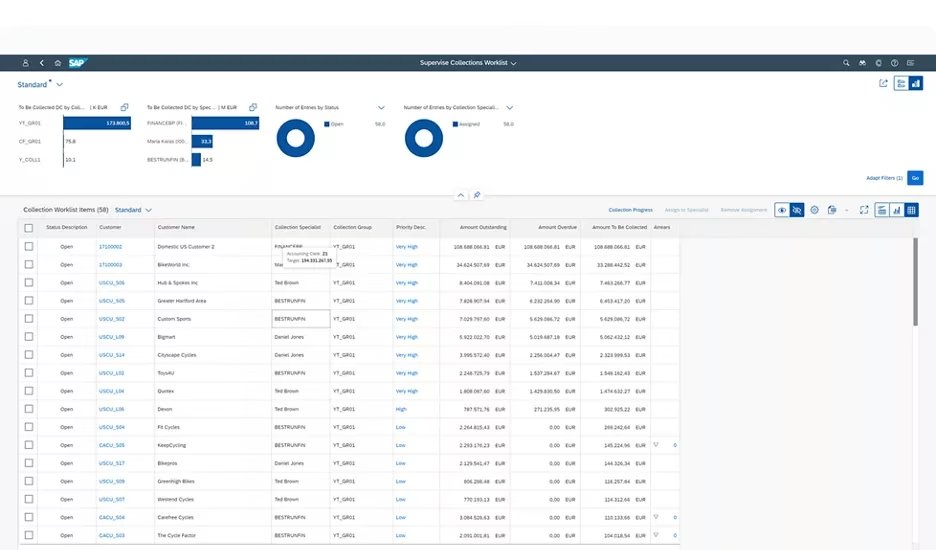
What is an AI agent for SAP accounts receivable?
An AI agent for SAP accounts receivable is software that reads FI-AR data in SAP S/4HANA or ECC, decides the next step and acts within approval levels you set.
SAP holds the ledger: open items, clearing, dunning and dispute cases. Its accounts receivable functionality is there “to manage open invoices and incoming payments, as well as to monitor and follow up on overdue receivables” (SAP Help Portal). The agent works on those objects, plus what arrives outside SAP: remittance PDFs, customer emails and portal downloads.
Gartner expects 40% of enterprise apps to include task-specific AI agents by the end of 2026, up from less than 5% in 2025 (Gartner, 2025).
Among the 198 DACH SAP user companies DSAG surveyed in 2026, 54% run SAP ECC or the Business Suite, and 56% run S/4HANA on-premises (DSAG, 2026). Many run both, so an agent has to work with ECC and S/4HANA, often in one group.
For the general definition, read what an AI agent in accounts receivable is.
What does an AI agent read and write in SAP FI-AR?
An AR agent reads open items, customer master data, payment history, bank statement items and dispute cases from SAP FI-AR, and writes back only approved entries.
In SAP, “an incoming payment, which is used in accounts receivable, clears an open debit amount,” and clearing brings the items to a zero balance (SAP Learning). What matters is which item a payment clears, and who approves it. SAP FI-AR automation starts with read access, not write access.
How does an AI agent connect to SAP S/4HANA and ECC?
An AI agent connects to SAP S/4HANA or ECC with its own SAP user and role, reads the FI-AR data it needs, and hands entries back only after approval.
For AI agent SAP integration, your SAP team picks the connection method, which differs between S/4HANA and ECC. SAP documents APIs for receivables on S/4HANA, such as posting bank statements and creating payment advices.
Finance decides what the agent’s user may read and which actions need an approver. Our recommendation:
- Give the agent its own SAP user, never a shared one.
- Grant read access per company code.
- Keep posting rights behind an approval step, so SAP authorizations and your approval levels draw the same line.
SAP ECC AR automation doesn’t have to wait for the migration. SAP’s mainstream maintenance for Business Suite 7 core applications runs to the end of 2027, with optional extended maintenance to the end of 2030 (SAP, 2020). Dates and paths: the SAP ECC end of maintenance playbook.
Transformance connects to SAP S/4HANA and ECC, Oracle, NetSuite and Dynamics. It deploys in your own cloud (VPC), with SSO/SAML, role-based access (RBAC) and a full audit trail.
Where do approvals sit before an AI agent posts to SAP?
Approvals sit at four levels: an AR agent reads freely, recommends for review, executes only approved actions, and never posts to SAP without a person’s sign-off.
In FI-AR terms:
- Read: open items, customer master, payment history and bank statement items. No approval is needed, and nothing in SAP changes.
- Recommend: proposed matches, draft reminders, a suggested dunning block or dispute case. A person reviews each one.
- Execute: reminders and collection calls go out only after your team approves them.
- Post: clearing entries, residual items and on-account postings reach SAP only after a named approver signs off.
Transformance builds Vero on this 4-level model, with a human in the loop for every ERP posting. Postings carry 100% posting validation (debits equal credits, valid GL account, required fields, entity posting rules), and the controller sees a pass/fail preview. Nothing posts without human sign-off.
Segregation of duties holds: the person who resolves an exception shouldn’t approve its posting, and write-offs and credit decisions stay with people. Within SAP permissions, the agent’s SAP user can’t post what its approval level doesn’t allow.
How is an AI agent different from rules configured in SAP?
Rules you configure in SAP apply the logic you define to data already in SAP; an AI agent also reads inputs from outside SAP and proposes a next step.
Three examples from SAP’s documentation:
- Bank statements: interpretation algorithms “are used to identify open items that you wish to clear after receiving a bank statement”, mostly from the note to payee, set per external transaction type in Customizing.
- Collections: in SAP Collections Management, “customers that fulfill the rules defined in a strategy are distributed to worklists”.
- Dunning: SAP creates dunning proposals that you review before the notices go out.
The agent works next to those rules:
- A configured rule gives the same result for the same input and works on what’s already in SAP, such as a note-to-payee reference.
- An agent reads what arrives outside SAP (a remittance PDF, an email listing 40 invoices, a portal download), links it to the customer’s history and proposes the clearing, reminder or dispute, with its reason.
DocSense reads remittances with over 97% extraction accuracy across 100+ document types and 170+ languages, with zero template configuration. Because Vero works on Customer 360, one graph per customer, last week’s promise to pay sits next to the open items when it decides.
The agent doesn’t replace your SAP configuration: its proposals clear through FI-AR like any other posting, and the rules keep running.
What does an AI agent do in each SAP AR process?
On SAP, an AR agent works across payment matching, collections and disputes, and each process ends in an action or entry that a person approves.
Cash application in SAP
AI for cash application in SAP starts when the bank statement arrives: the agent reads the remittance and proposes which open items each payment clears. Payments it can’t place stay on account or go to an exception queue with the reason.
Example (illustrative): one short payment, before and after
- Before: A customer pays EUR 48,500 against three open invoices of EUR 20,000, EUR 18,000 and EUR 12,000. The note to payee carries no invoice numbers; the list sits in a PDF email, so a clerk reads it and clears the items by hand.
- After: The agent reads the PDF, proposes clearing all three invoices and a EUR 1,500 residual item for the shortfall, and drafts a dispute case for it. The approver checks the pass/fail preview and signs off; a person decides the dispute.
Among users of the cash application software Hackett assessed, the median auto-match rate is 70%, and a third exceed 80% (The Hackett Group, 2025). ClearMatch reaches a 95% auto-match rate and runs end to end in under 8 minutes (Transformance customer data, 2026). Step by step: how to automate cash application with AI.
Collections and dunning in SAP
The agent reads overdue open items, dunning levels, blocks and contact history, drafts the reminder or prepares the call, and logs the promise to pay. Each action is approved at the execute level.
Vero handles 60-80% of routine collection touches, and 100% of overdue invoices are actioned within 24 hours, against 30-40% for manual teams (Transformance customer data, 2026). On the same data, DSO comes down 8-12 days on average. More in how AI automates collections.
Disputes and deductions in SAP
SAP Dispute Management for FI-AR “contains functions for processing receivables-related dispute cases”, according to SAP’s documentation. For a short payment, the agent reads the customer’s email or claim and proposes a dispute case with the evidence and likely reason. A person accepts or rejects it, and write-offs stay with people.
How do you start with an AI agent on SAP?
Start an AI agent on SAP with one company code, read-only access first, recommendations before execution, and every posting behind approval from day one.
- Pick one company code and one process pair, usually cash application and collections.
- Create the agent’s SAP user with read access only, and baseline auto-match rate, unapplied cash and overdue invoices actioned per week.
- Run at the recommend level in parallel with your team, then switch on execute for reminders.
- Turn on the post level with a named approver, kept separate from exception handling.
A Gartner survey of 160 senior finance leaders in 2026 found that AR automation is among the AI uses that “generally deliver returns within nine to 10 months” (Gartner, 2026). Transformance runs a proof of value in 4-5 weeks on one entity, and a full rollout takes up to 4-8 weeks.
Conclusion: an AI agent on SAP reads widely and posts narrowly
AI agents for SAP accounts receivable read FI-AR in S/4HANA or ECC, plus everything that arrives outside SAP. They propose and execute within approval levels you set, and nothing posts without a person’s sign-off.
Frequently Asked Questions
How do AI agents work with SAP for accounts receivable?
AI agents connect to SAP S/4HANA or ECC, read open items, payments and customer data, and propose matches, reminders and dispute cases. Nothing posts to FI-AR without a person’s sign-off.
Can an AI agent post to SAP on its own?
An AI agent shouldn’t post to SAP on its own, and in a well-governed setup it can’t: a named approver signs off each entry. ClearMatch runs 100% posting validation, and nothing posts without human sign-off.
Does an AI agent work with SAP ECC or only with S/4HANA?
An AI agent can work with both, because both share the FI-AR concepts of open items, clearing, dunning and dispute cases. In DSAG’s 2026 survey of DACH SAP user companies, 54% run ECC or the Business Suite, and 56% run S/4HANA on-premises.
What data does an AI agent need from SAP?
An AI agent needs read access to open items, the customer master, payment history and bank statement items, plus dunning and dispute data where you use them. Posting rights stay behind an approval step.
How is an AI agent different from the rules configured in SAP?
Rules configured in SAP, such as interpretation algorithms or collection strategies, apply the logic you define to data already in SAP. An agent also reads remittances, emails and portals outside SAP and proposes a next step.
How long does it take to start an AI agent on SAP?
Starting an AI agent on SAP takes weeks on one company code. With Vero, a proof of value on one entity takes 4-5 weeks, and a full rollout takes up to 4-8 weeks.


