


Key Takeaways
- An AR agent reads six kinds of objects in Oracle or NetSuite and writes only two, each after a named approver signs off.
- Oracle says new NetSuite integrations should use REST web services with OAuth 2.0 from release 2026.1, and SOAP-based integrations stop working with release 2028.2 (Oracle NetSuite Help Center, 2026).
- Oracle Fusion Cloud Receivables applies receipts with AutoMatch rule sets you configure; an agent adds evidence the receipt does not carry, such as remittance PDFs.
- ClearMatch from Transformance reaches a 95% auto-match rate and runs end to end in under 8 minutes (Transformance customer data, 2026).
In This Article
- Key Takeaways
- What is an AI agent for Oracle and NetSuite accounts receivable?
- What does an AI agent read and write in Oracle and NetSuite?
- How does an AI agent connect to NetSuite?
- How does an AI agent connect to Oracle Fusion Cloud and E-Business Suite?
- How is an AI agent different from AutoMatch, AutoCash and NetSuite’s payment rules?
- Where do approvals sit before an AI agent writes back to Oracle or NetSuite?
- What does an AI agent do in each AR process on Oracle or NetSuite?
- How do you start with an AI agent on Oracle or NetSuite?
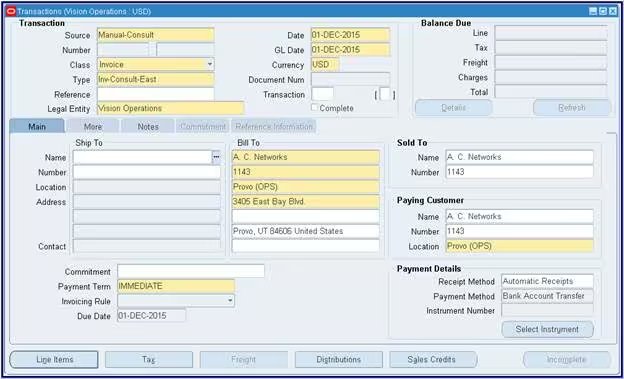
What is an AI agent for Oracle and NetSuite accounts receivable?
An AI agent for Oracle or NetSuite accounts receivable is software that reads receivables data from the ERP, chooses the next step and acts only within the approval levels you set.
The ERP stays the system of record. “A customer payment transaction records a customer payment and applies it to the appropriate invoice or cash sale,” in NetSuite’s own words (Oracle NetSuite Help Center, 2026). The agent works on those records and on what arrives outside them, such as remittance PDFs.
Oracle offers Premier Support for the E-Business Suite Continuous Innovation releases “through at least 2037” (Oracle, 2026). Groups can run it next to Fusion or NetSuite entities for years, so an agent must work across the mix.
Among users of the cash application software Hackett assessed, the median auto-match rate is 70% (The Hackett Group, 2025). The receipts left open are the agent’s work.
More in what an AI agent in accounts receivable is and, for SAP, how AI agents work with SAP.
What does an AI agent read and write in Oracle and NetSuite?
An AR agent reads open invoices, receipts, customer accounts and payment history in Oracle or NetSuite, and writes back only approved receipt applications and short-pay entries.
Of the six object types in the table, an agent writes to only two, and both writes wait for approval. The ledger, your matching rules and credit decisions stay in the ERP.
How does an AI agent connect to NetSuite?
An AI agent connects to NetSuite as an integration with its own role, and Oracle says integrations built from release 2026.1 should use SuiteTalk REST web services with OAuth 2.0.
Oracle’s SOAP removal plan (Oracle NetSuite Help Center, 2026):
- 2025.2 is the last planned SOAP endpoint.
- With 2027.1, “you will no longer be able to build new integrations using SOAP web services”; existing ones keep working.
- With 2028.2, “all endpoints will be disabled, and SOAP-based integrations will stop working”.
Check any NetSuite receivables integration you run or plan against these dates.
Give the agent a dedicated integration role with least-privilege permissions for the subsidiaries in scope. Receipt applications live on the customer payment record, where Oracle documents updates that add an invoice, change the applied amount or unapply one (Oracle NetSuite Help Center, 2026).
How does an AI agent connect to Oracle Fusion Cloud and E-Business Suite?
An AI agent reaches Oracle Fusion Cloud Receivables through Oracle’s documented resources, such as Standard Receipts, and E-Business Suite through interfaces your Oracle team chooses per object.
Oracle’s Standard Receipts resource records “payment from customers”; a receipt “can be applied to one or more transactions”, with remittance references for the Apply Receipts Using AutoMatch process (Oracle Help Center, 2026). Its apply, unapply, reverse and refund actions are writes, so each sits behind an approval.
On both ERPs the principle holds: the agent’s own user, broad reads, narrow writes, a named approver and an audit trail entry for every action.
How is an AI agent different from AutoMatch, AutoCash and NetSuite’s payment rules?
Oracle’s AutoMatch scores receipts against open transactions using thresholds you configure; an AI agent adds evidence from outside the ERP, such as remittance emails, PDFs and customer history.
Oracle documents how Fusion Receivables decides (Oracle Help Center, 2026):
- AutoMatch rule set: assigned at customer site, customer account, lockbox or system option level, it “defines the minimum qualifying percentage score, based on assigned thresholds, necessary to recommend transactions”. When a recommendation scores above the Combined Weighted Threshold, the Apply Receipts Using AutoMatch process applies it.
- AutoCash: in lockbox processing, the active AutoCash rule can apply a receipt that carries a balance forward billing number.
- Reason codes: a recommendation that is not applied carries a reason, such as “Below transaction threshold”.
In NetSuite, the accounting preference Apply Payments without Invoice Numbers sets how such payments are applied (Oracle NetSuite Help Center, 2026).
Rules and agent split the work:
- A rule scores what the receipt carries: a reference, an amount, a customer.
- An agent reads the email that lists 40 invoices, ties it to the customer’s payment history and proposes the application, with its reason.
Vero, the AI agent from Transformance, works on Customer 360, one graph per customer. For a receipt the rules leave open, Vero investigates from that record, fetches internal and external information to find more matches and proposes the application with its evidence. A person approves. DocSense reads remittances with over 97% extraction accuracy and zero template configuration; more in how AI reads remittance advice.
The rules keep running, and approved proposals post as ordinary receipt applications or customer payments.
Where do approvals sit before an AI agent writes back to Oracle or NetSuite?
Approvals sit at four levels: the agent reads freely, recommends for review, executes approved actions, and applies receipts in Oracle or NetSuite only after a named approver signs off.
Transformance builds Vero on this 4-level model. ClearMatch runs 100% posting validation, and nothing posts without human sign-off.
Transformance connects to SAP S/4HANA and ECC, Oracle, NetSuite and Dynamics, with data hosted in your region, VPC deployment in your own cloud, SSO/SAML, RBAC and a full audit trail.
Segregation of duties holds: whoever resolves an exception does not approve its posting, and the agent’s ERP role enforces the same line.
What does an AI agent do in each AR process on Oracle or NetSuite?
On Oracle or NetSuite, an AR agent works across cash application, collections and disputes, and each process ends in an entry or an action that a person approves.
Cash application on Oracle or NetSuite
AI for cash application starts where the rules stop: the agent reads the remittance, proposes the application and queues the rest with a reason.
Example (illustrative): a wire for four invoices, one of them short
- Before: A NetSuite subsidiary receives a USD 61,250 wire with “INV PMT OCT” as its only text. Four invoices are open: USD 18,400, 15,750, 14,600 and 13,500, together USD 62,250. The invoice list sits in a PDF in the AR inbox, waiting for a clerk.
- After: The agent reads the PDF, which lists all four invoices and a USD 1,000 deduction for a damaged delivery on the fourth. It proposes the first three in full and USD 12,500 to the fourth, leaving USD 1,000 open, and drafts a short-pay case with the PDF attached. The approver signs off; a person decides the deduction.
ClearMatch reaches a 95% auto-match rate and runs end to end in under 8 minutes (Transformance customer data, 2026). The full workflow: how to automate cash application with AI.
Collections on Oracle or NetSuite
The agent reads overdue items and past contacts, drafts the reminder or prepares the call, and records each promise to pay. With CollectPulse, Vero handles 60-80% of routine touches, 100% of overdue invoices are actioned within 24 hours (manual teams: 30-40%), and DSO comes down 8-12 days on average (Transformance customer data, 2026). More in how AI automates collections.
Disputes and deductions on Oracle or NetSuite
For a short pay, the agent proposes a case with the evidence and likely reason. ClaimIQ identifies deductions with 97% accuracy in under 15 seconds each, against 45 minutes by hand (Transformance customer data, 2026). Write-offs stay with people; more in how to automate partial payments and deductions.
How do you start with an AI agent on Oracle or NetSuite?
Start with one Oracle business unit or NetSuite subsidiary, read-only access first, recommendations before execution, and every write-back behind approval from day one.
- Pick one Oracle business unit or NetSuite subsidiary, and one process pair: cash application plus collections.
- Create the agent’s own integration user and role, read-only, scoped to that entity.
- Record your baseline: auto-match rate, unapplied cash, overdue invoices actioned per week.
- Run at the recommend level alongside your team, then switch on execute for reminders.
- Turn on write-back with a named approver who does not handle exceptions.
A 2026 Gartner survey of 160 senior finance leaders found that uses such as accounts payable and receivable automation “generally deliver returns within nine to 10 months” (Gartner, 2026). Transformance runs a proof of value in 4-5 weeks on one entity, and a full rollout takes up to 4-8 weeks. More in how long AR automation implementation takes.
Conclusion: the ERP keeps its rules, the agent brings the evidence
On Oracle and NetSuite, an AI agent reads widely, including emails and PDFs outside the ERP, and writes narrowly: receipt applications and short-pay entries, each behind a named approver. The same model applies to SAP FI-AR.
Frequently Asked Questions
How do AI agents work with Oracle and NetSuite for accounts receivable?
AI agents read open invoices, receipts and customer records in Oracle or NetSuite, propose applications, reminders and short-pay cases, and write back only after a person signs off.
Can an AI agent post to NetSuite or Oracle on its own?
No, in a well-governed setup it cannot: its role allows writes only behind an approval step. ClearMatch runs 100% posting validation, and nothing posts without human sign-off.
Which NetSuite API should an AR automation tool use?
Oracle says integrations built from NetSuite release 2026.1 onward should use SuiteTalk REST web services with OAuth 2.0. SOAP-based integrations stop working with release 2028.2.
How is an AI agent different from Oracle AutoMatch?
AutoMatch scores a receipt’s remittance references against open transactions, using thresholds you configure. An agent adds what the receipt does not carry, such as emails and PDFs, and proposes the application for approval.
What changes for an AI agent between Oracle E-Business Suite and Fusion Cloud?
The receivables concepts (transactions, customers, receipts) stay the same; the interfaces differ, and on E-Business Suite your Oracle team chooses them per object.
How long does it take to start an AI agent on Oracle or NetSuite?
A few weeks on one entity: with Transformance, a proof of value takes 4-5 weeks, and a full rollout up to 4-8 weeks.


