
Dynamics 365 Finance gives you a configurable, ERP-native cash flow forecast. Transformance CashPulse extends it with invoice-level accounts receivable signal from matched payments, remittance content, open collections cases and dispute status, so the forecast reflects what customers are actually doing. This guide shows what Dynamics 365 provides, what to add and how to integrate it.
Key Takeaways
- According to Microsoft Learn, the native Dynamics 365 Finance forecast considers open customer transactions, open vendor transactions, sales and purchase orders not yet invoiced, ledger transactions, budget entries and demand and supply forecasts.
- According to Microsoft Learn, the Finance insights cash forecast adds machine learning through AI Builder, multi-currency and cross-entity views, and what-if analysis through snapshot comparison.
- Transformance CashPulse layers invoice-level AR signal on top, with 90-95% forecast accuracy out to 90 days and 30-, 90- and 365-day horizons (Transformance platform data, 2026).
- Transformance delivers a first 13-week forecast in 2-4 weeks and goes fully live in up to 4-8 weeks, connecting to Dynamics 365 without replacing it.
- The practical recipe is three steps: set up the native forecast cleanly, feed it AR signal from cash application and collections, and tie scenarios to concrete actions.
In This Article
- Key Takeaways
- What Cash Forecasting in Dynamics 365 Covers
- How Native Dynamics 365 Cash Flow Forecasting Works
- What an AR Layer Adds to Dynamics 365 Forecasting
- How to Build an Accurate Cash Forecast Around Dynamics 365
- How Transformance CashPulse Extends Dynamics 365 Forecasting
- Comparing Your Options for Dynamics 365 Cash Forecasting
- Frequently Asked Questions
- Conclusion
What Cash Forecasting in Dynamics 365 Covers
Cash flow forecasting in Dynamics 365 Finance is a native module that projects future cash inflows and outflows. Per Microsoft Learn, it combines open customer and vendor transactions, sales and purchase orders that are not yet invoiced, free text invoices that are not yet posted, general ledger transactions, budget register entries, project forecasts and demand and supply forecasts. You define forecast models that decide which sources and time buckets feed the projection, then review the results in the Cash flow forecasting workspace.
The module runs at legal entity level and groups results by cash flow type, so treasury and finance teams see projected inflows and outflows by category. That makes it a solid foundation for budget-versus-actual tracking and for teams with disciplined ledger and master data.
Business Central, Microsoft's other ERP, has its own cash flow forecast functionality; check Microsoft's Business Central documentation for its exact scope before planning a group-wide rollout across both products.
How Native Dynamics 365 Cash Flow Forecasting Works
Forecast Models and Data Sources
Each forecast model selects its sources, such as open invoices, orders, ledger accounts and budget models. Three settings determine when each item affects cash: the time between shipping date and invoice date, the terms of payment, and the time between invoice due date and payment date. The last one can be overridden per customer group, which lets you reflect that some customer groups pay later than their terms.
Calculation and Refresh
Per Microsoft Learn, you run the cash flow calculation process before viewing forecast analytics. The calculation can be total or incremental and can be scheduled as a recurring batch with cash flow forecast automation. In practice, the forecast is refreshed on that calculation schedule, so setting a sensible cadence matters for near-term accuracy.
Finance Insights
Finance insights extends the workspace. According to Microsoft Learn, it uses machine learning through AI Builder for time series forecasting, shows the forecast in multiple currencies across legal entities, and supports what-if analysis by comparing optimistic, pessimistic and most realistic snapshots. For many groups, this is the right first step before adding any external layer.
What an AR Layer Adds to Dynamics 365 Forecasting
The native forecast is built from ERP data and configured timing rules. The information that decides when a specific customer actually pays often sits in processes around the ERP: remittance advices, unmatched payments, open deductions and collections conversations. An AR layer brings that information into the forecast.
- Remittance and dispute context. Matched and unmatched payments, remittance advice content and open deductions show which receivables are about to convert and which are held up.
- Customer-level payment behavior. Timing assumptions per customer group can be refined with each customer's own payment history and seasonality.
- Promise-to-pay data. A committed date, or a broken promise, changes expected cash the moment it happens. Transformance CollectPulse captures 3x more promise-to-pay commitments than manual follow-up.
- Action-linked scenarios. Native what-if snapshots compare parameter sets; an AR layer can tie a scenario to a concrete action, such as prioritizing the 20 largest overdue accounts.
- Entity and currency views fed by live signal. Rolling up many legal entities is easier when each entity contributes the same AR signal in one model.
Teams that want to go deeper can read our guides on predicting cash inflows from AR and multi-entity cash flow forecasting.
How to Build an Accurate Cash Forecast Around Dynamics 365
Getting to an accurate forecast does not mean replacing Dynamics 365. It means building on what the ERP already provides and adding the AR signal around it.
- Start with clean foundations. Map forecast models to the right main accounts, keep budget entries current and review the customer-group payment-delay settings.
- Feed in real-time AR match status. Connect cash application output so the forecast reflects invoices that are matched, in dispute or still unmatched.
- Add collections and promise-to-pay data. Payment expectations change as soon as a customer commits to a date; the forecast should reflect that the same day.
- Roll up entities and currencies in one model. Use the native multi-currency and cross-entity views, and add a consolidation layer where you need a single AR-driven view.
- Run scenarios tied to actions. Ask what happens if you accelerate collections on your top 20 overdue accounts, and see the effect on the 30-day number.
- Review forecast accuracy against actuals every month. Track variance by entity and customer group, and feed the findings back into the settings.
The same discipline applies if you also work with a 13-week cash flow forecast: start from clean data, then add the signal that moves cash.
How Transformance CashPulse Extends Dynamics 365 Forecasting
Transformance CashPulse builds its forecast on top of Dynamics 365. It ingests live output from ClearMatch (cash application) and CollectPulse (collections), so the forecast reflects which invoices have been matched, which carry promise-to-pay commitments and which sit in active disputes.
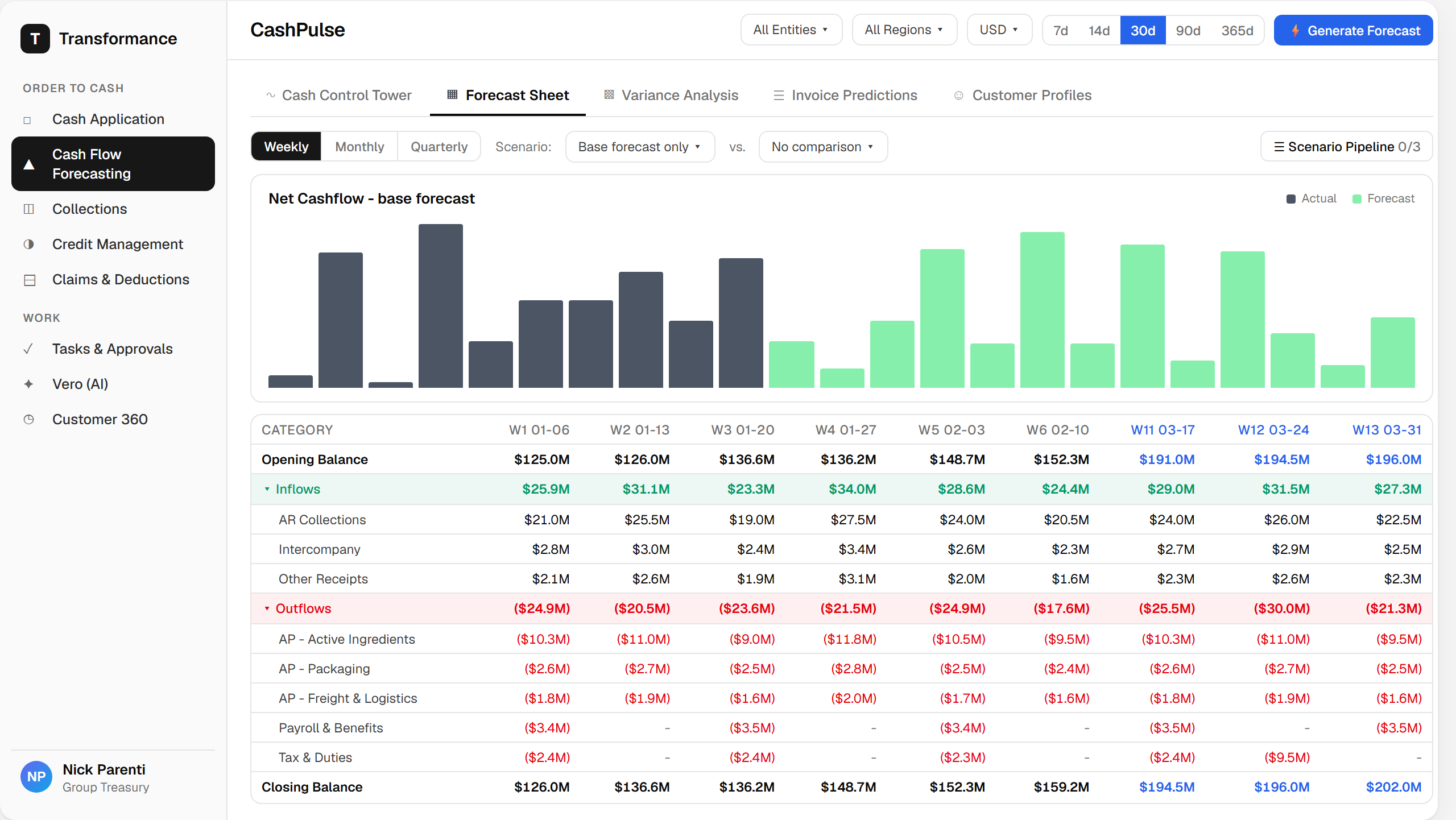
The CashPulse Cash Control Tower shows opening cash position, 30-day expected inflow, cash at risk and predicted DSO, broken out by entity and currency. CashPulse delivers 90-95% forecast accuracy out to 90 days, with 30-, 90- and 365-day horizons and 100+ drivers on one model across 20+ countries. Scenario simulation ties to specific collections actions, so a treasury team can model prioritizing a set of accounts and see the projected impact.
ClearMatch auto-matches 95% of payments and runs end to end in under 8 minutes, with 100% posting validation: nothing posts to the ERP without human sign-off. CollectPulse actions 100% of overdue invoices within 24 hours and lowers DSO by 8-12 days on average. Those results flow straight into the forecast, because a forecast is only as good as the AR data underneath it.
Integration keeps Dynamics 365 as the system of record. Transformance connects to Dynamics 365 and reads and writes back through standard integration points, with a 4-level approval model (read, recommend, execute, post), VPC deployment so data stays in your cloud, SSO/SAML, RBAC and a full audit trail. Transformance delivers a first 13-week forecast in 2-4 weeks and a full rollout in up to 4-8 weeks, with a proof of value in 4-5 weeks on one entity.
Many finance teams start with the month-end close, since unmatched cash and unresolved deductions often delay it, and extend into forecasting once the AR data is flowing.
Comparing Your Options for Dynamics 365 Cash Forecasting
| Approach | Data source | Best for |
|---|---|---|
| Native Dynamics 365 Finance cash flow forecasting | Open customer and vendor transactions, orders not yet invoiced, ledger and budget entries, demand and supply forecasts | Teams that want a configurable, parameter-based forecast inside the ERP |
| Finance insights cash forecast in Dynamics 365 | Dynamics 365 Finance data, with machine learning through AI Builder, multiple currencies across legal entities and what-if snapshots | Teams that want ERP-native machine learning forecasting and snapshot comparison |
| Spreadsheet forecasting | Exported ledger and AR reports | Small entity counts and one-off scenarios |
| Transformance CashPulse | Live AR signal from ClearMatch and CollectPulse (matched payments, remittance content, disputes, promise-to-pay) alongside ERP data | Teams that want invoice-level AR signal, 30-, 90- and 365-day horizons and 90-95% forecast accuracy out to 90 days |
Frequently Asked Questions
Does Dynamics 365 Finance have built-in cash flow forecasting?
Yes, Dynamics 365 Finance includes a native Cash flow forecasting workspace that projects cash from open customer and vendor transactions, orders not yet invoiced, ledger and budget entries and other configurable sources. Timing is driven by terms of payment and settings you can override per customer group.
Can Dynamics 365 forecast across entities and currencies?
Yes, according to Microsoft Learn, the Finance insights cash forecast lets you view the forecast in multiple currencies and across legal entities. Transformance CashPulse adds entity and currency views fed by live AR signal, on one model across 20+ countries.
How do I connect AR data to my Dynamics 365 cash forecast?
Connect an AR layer such as Transformance CashPulse to Dynamics 365. CashPulse reads matched payments, remittance content, dispute status and promise-to-pay data from ClearMatch and CollectPulse and combines them with ERP data, so the forecast reflects the state of each receivable.
Why might my Dynamics 365 cash forecast differ from actual receipts?
Timing assumptions are set at parameter level, for example terms of payment and the days between due date and payment per customer group, so individual customers who pay earlier or later than that setting create variance. Invoice-level signal such as remittances, disputes and promise-to-pay dates narrows that gap.
How long does it take to add AI forecasting to Dynamics 365?
Transformance delivers a first 13-week forecast in 2-4 weeks, with full rollout in up to 4-8 weeks and a proof of value in 4-5 weeks on one entity. Timing depends on entities, data quality and the modules in scope.
Does adding a forecasting layer replace Dynamics 365?
No, CashPulse works alongside Dynamics 365 and does not replace it. It connects through standard integration points, and the ERP stays the system of record, with a human in the loop for ERP postings.
Conclusion
Dynamics 365 gives you a configurable, ERP-native cash forecast, and Finance insights adds machine learning, multi-currency and cross-entity views. Adding live AR signal from cash application, collections and disputes turns that baseline into an invoice-level forecast, and Transformance CashPulse delivers it with 90-95% forecast accuracy out to 90 days.
If your team wants to see what an AR-driven forecast looks like on top of your Dynamics 365 environment, book a call with Transformance to walk through it on your own data.