


Key Takeaways
- Transformance supports Oracle Fusion Cloud ERP and Oracle E-Business Suite; ERP connections typically take 2-3 days, and your IT team may be involved.
- It reads Receivables data per business unit or operating unit, and writes back receipt applications, journal entries and reversals only after a person approves.
- Oracle separates two corrections: you unapply a receipt applied in error and reverse one when no payment was received (Oracle, 2026).
- A proof of value runs 4-5 weeks on one business unit or operating unit; the full rollout takes 4-8 weeks.
In This Article
- Key Takeaways
- Does Transformance work with Oracle Fusion Cloud ERP and EBS?
- What does Transformance read from Oracle Receivables?
- What does Transformance write back to Oracle, and who approves it?
- How does Transformance connect to Oracle Fusion Cloud ERP?
- How does Transformance connect to Oracle E-Business Suite?
- How do business units, ledgers and currencies affect the connection?
- What stops a receipt application from posting in Oracle?
- How is a wrong receipt application corrected in Oracle?
- How do you set up the Transformance connection to Oracle?

Does Transformance work with Oracle Fusion Cloud ERP and EBS?
Yes. Transformance supports Oracle Fusion Cloud ERP and Oracle E-Business Suite: it reads receivables data and writes back approved receipt applications, journal entries and corrections.
Transformance on Oracle Fusion Cloud ERP and E-Business Suite: what it reads, writes back and how it connects
Oracle object names as Oracle documents them; which route your connection uses is agreed with your Oracle team.
An Oracle integration for AR automation is a connection that reads Receivables data per business unit or operating unit and writes approved results back as ordinary Oracle receipt activity, so Oracle stays the system of record. NetSuite, a separate Oracle product, has its own guide: how Transformance integrates with NetSuite.
The Hackett Group found a median auto-match rate of 70% among the end users it assessed, and noted that “a surprising number of organizations are accepting automation rates below 40%” (The Hackett Group, 2025). On Oracle, the gap is the receipts lockbox, AutoMatch and AutoCash leave open, and that is where Transformance works.
ERP connections typically take 2-3 days, and your IT team may be involved; the full rollout takes 4-8 weeks.
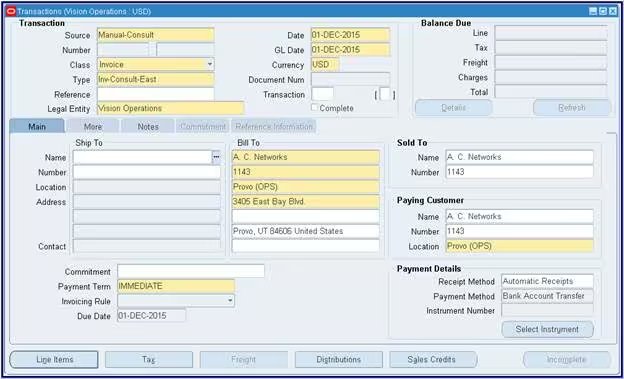
What does Transformance read from Oracle Receivables?
Transformance reads customer accounts, open transactions with their installments, receipts and their status, bank statement lines, journal entries and remittances, scoped to the business units or operating units you choose.
Customers. Customer accounts and sites, plus the paying relationships (Pay Any, Pay Below) that decide whether one customer may pay another’s transactions (Oracle, 26D, 2026).
Open transactions. Invoices, credit memos, debit memos and chargebacks. Oracle keeps one payment schedule per installment, with its due date and the amount still due, and a receipt is applied to an installment, not to the invoice header: a three-installment invoice is three open items. Table names: where Oracle keeps installments and due dates.
Receipts and their status. Applied, unapplied, unidentified or on account. In Fusion, “an unidentified receipt is a receipt without customer information”, and applying it stays disabled “until customer information is provided” (Oracle, 26D). The E-Business Suite 12.2 guide is shorter: “You cannot apply an unidentified receipt” (Oracle Receivables User Guide, 12.2).
Bank and remittance data. Bank statement lines in Cash Management, lockbox transmissions and remittance references on receipts. The remittance advice in an email or PDF never reaches Oracle; DocSense reads it with over 97% extraction accuracy across 100+ document types and 170+ languages, with zero template configuration (how AI reads remittance advice).
Every read lands in Customer 360, Vero’s working memory with one graph per customer. Cross-ERP field map: what AR automation reads from and writes to the ERP.
What does Transformance write back to Oracle, and who approves it?
Transformance writes back receipt applications, journal entries and corrections such as reversals, each only after a person approves it within thresholds you set by amount, entity and customer.
The clearing posting, in Oracle’s terms. What SAP calls clearing, Oracle calls a receipt application. A standard receipt “can be applied to one or more transactions” (Oracle REST API, 26D, 2026), so a EUR 24,000.00 receipt for three invoices becomes three applications on one receipt (illustrative).
What is left. A remainder stays unapplied unless your Oracle rules handle it; in Fusion, the application exception rule set “manages the handling of over and under payments after receipt application” (Oracle, 26D). Short pays go to a case with the evidence, and a person decides (partial payments and deductions).
Control. Transformance works in a multi-level approval model (read, recommend, execute, post) with a human in the loop for ERP postings. Thresholds run by amount, entity and customer, and roles separate the admins who configure rules from the finance users who approve. ClearMatch runs 100% posting validation, and nothing posts without human sign-off (ClearMatch).
Oracle’s rules keep running. An approved application is ordinary Oracle receipt activity, and lockbox, AutoMatch and AutoCash go on working. How an agent sits beside those rules: how AI agents work with Oracle and NetSuite.
Audit log. The audit trail stores the timestamp, what the system did, what the user did, who approved, the input and the confidence. Who approved an application sits in the Transformance log. Thresholds in detail: who approves what when an AI agent works in your ERP.
How does Transformance connect to Oracle Fusion Cloud ERP?
Transformance connects to Fusion Cloud ERP through APIs, file transfer or your middleware, with a dedicated integration user your Oracle team creates; the method follows your environment.
Fusion offers external systems three families of routes, all Oracle’s design:
- REST resources. Standard Receipts covers create, get, update and delete, plus actions to apply a receipt, bulk apply it to several invoice installments, unapply it from an installment, reverse it and refund it (Oracle REST API, 26D, 2026).
- SOAP web services. Oracle lists Receivables web services such as the Receivables Create and Apply Receipt Service (Oracle, 26D).
- File-based data import (FBDI). Excel templates for batch uploads; the Receivables Standard Receipt Import template feeds the Fusion lockbox (Oracle, 26D).
These are Fusion’s routes, not a fixed Transformance method.
The integration user. Your Oracle team creates one dedicated integration user and role for Transformance, never a person’s login: read-only at first, limited to the business units in scope, with write roles added only when write-back starts. Least privilege in general: how AI agents access ERP data safely.
In a typical ERP connection of 2-3 days, your IT team may create the user and role, open the network path or allowlist, confirm the route and provide a test environment.
Hosting and access. Your data stays in your region, in a separate Azure environment per location, with VPC deployment available; sign-in runs through SSO/SAML with RBAC. No customer data is used to train models.
How does Transformance connect to Oracle E-Business Suite?
For E-Business Suite in your data centre or a hosted environment, Transformance connects through its own on-premises agent, APIs, file transfer or middleware, chosen with your Oracle team.
On the PL/SQL side, the public receipt API AR_RECEIPT_API_PUB has routines to create a cash receipt, apply it to “a particular installment of a debit item” (which “can also be a cross currency application”), unapply it, apply it on account, reverse it, and apply it to an activity “such as Receipt Write-off” (Oracle Receivables Reference Guide, 12.2).
AutoLockbox “is a three step process”: import loads the bank file into AR_PAYMENTS_INTERFACE_ALL, validation moves it into the QuickCash tables, and Post QuickCash applies the receipts and updates customer balances. When matching rules fail, Post QuickCash tries the AutoCash rule set; “if the AutoCash rules also fail to apply the receipt, Lockbox assigns the receipt a status of Unapplied” (Oracle Receivables User Guide, 12.2). Those receipts are where Vero starts.
Operating units set the boundary. “In Oracle E-Business Suite, operating units are used to determine in which ledger a given subledger transaction is accounted and to partition set up reference data, processing and security” (Oracle, 25D, 2025). An integration user set up for one operating unit sees none of the others’ receipts.
EBS and Fusion side by side. Oracle will continue offering Premier Support on the Continuous Innovation releases for on-premises applications “through at least 2037” (Oracle, 2026), so many groups run EBS next to Fusion for years. In Fusion, business units “replace your operating units in the Oracle E-Business Suite” (Oracle, 25D). Keep the mapping of units, customer numbers, receipt methods and bank accounts written down, so the connection plan survives the move.
How do business units, ledgers and currencies affect the connection?
Oracle scopes every receipt to a business unit or operating unit and accounts it in a ledger, so decide per unit which receipts, bank accounts and currencies are in scope.
Every receipt carries its unit. A Fusion standard receipt requires a business unit, a receipt method and an amount, and its accounting date is “the date when the standard receipt is accounted” (Oracle REST API, 26D, 2026). The receipt method ties the receipt to its remittance bank account; the accounting date decides its period.
Parents paying for subsidiaries. Fusion applies a receipt to unrelated customers’ open items only “if the Allow Payment of Unrelated Transactions system option is set to Yes”, or within a paying relationship (Oracle, 26D). Without either, a head office’s lump sum cannot be applied to its subsidiaries’ invoices and stays unapplied.
Currencies. In Fusion, if the rate changes when a foreign currency application posts to general ledger, “Receivables records a realized gain or loss amount” (Oracle, 26D). Illustrative: a EUR 10,000.00 invoice booked into a USD ledger at 1.0800 carries USD 10,800.00; a receipt accounted at 1.0850 brings USD 10,850.00 and books USD 50.00 of realised gain. Agree the rate source and the gain and loss accounts with your controller before write-back.
Start with one unit. Run the proof of value for 4-5 weeks on one entity, in Oracle typically one business unit or operating unit; further units join per the rollout plan (running AR across many legal entities).
What stops a receipt application from posting in Oracle?
Oracle blocks or holds an application when the receipt is unidentified, the applied amount exceeds it, the period is closed, a rate is missing or the payer is unrelated.
What stops a receipt application in Oracle, and how it is handled
Sources: Oracle, lockbox import process and receipt guidelines (26D, 2026); Receivables User Guide (12.2).
Two rows cause most of the early noise. Lockbox checks that “amounts to apply don’t exceed the receipt amount” (Oracle, 26D), so USD 18,520.00 of applications against a USD 18,250.00 receipt (illustrative) waits in the interface table. And when lockbox or AutoMatch applies a receipt overnight, a proposal built on yesterday’s read would apply it again: read the status first.
For an unidentified receipt, Vero investigates from Customer 360 and from internal and external sources, proposes the customer and the application with the evidence, and a person approves both. More in how to match a payment with no reference and on Vero.
How is a wrong receipt application corrected in Oracle?
In Oracle, you unapply a receipt applied to the wrong transaction and reverse a receipt when no payment arrived; Transformance writes either correction back only after a person approves.
Oracle draws the line itself: “You reverse a receipt when no payment was received from the customer for the receipt amount.” And: “You unapply a paid receipt either to return payment to the customer or to reapply a receipt applied in error to the correct transaction” (Oracle, 26D, 2026).
The case decides the correction:
- Wrong invoice. Unapply, then apply to the right one. Illustrative: USD 12,400.00 applied to invoice 4711 instead of 4712 moves to 4712; the receipt stays.
- No payment arrived (a returned direct debit, a stopped cheque). Standard reversal: Oracle “creates reversal journal entries in the general ledger and reopens all of the debit and credit items that were closed by the original receipt” (Oracle, 26D).
- A related chargeback is already in GL (E-Business Suite). “You must create a debit memo reversal”, which “creates one new receivable in the amount of the net of the closed debit and credit transactions” (Oracle Receivables User Guide, 12.2).
- Money goes back to the customer. Unapply, and create a credit memo against the original transaction. Deleting is only possible for manual receipts not yet applied and automatic receipts in an unapproved batch (Oracle, 26D).
Closed periods need a decision too. In E-Business Suite, if the original application’s GL date is in a closed period, the reapplication defaults to “the current date. If the current date is not open, the default is the last date of the most recent open period” (Oracle, 12.2). Once September is closed, a September error corrected on 6 October lands in October. Agree the cut-off with your controller (period close).
On the Transformance side, a correction is an approved write-back like any other, with its own audit log entry. Reversals across ERPs: what an AI agent’s audit trail in finance records.
How do you set up the Transformance connection to Oracle?
Set up the Oracle connection in seven steps, from one business unit and a read-only integration user to approved write-back; ERP connections typically take 2-3 days.
Seven steps to connect Transformance to Oracle
- Pick the scope: one Fusion business unit or EBS operating unit, with its receipt methods, remittance bank accounts and currencies.
- Choose the route with your Oracle team: APIs, file transfer, middleware or, for E-Business Suite in your data centre, the Transformance on-premises agent.
- Create a dedicated integration user and role, read-only and limited to the units in scope.
- Connect and reconcile the first read: open installments, unapplied and unidentified receipts and bank statement lines against Oracle’s own totals for that unit.
- Start with proposals: Vero proposes applications with the evidence, your team approves or rejects them, and Oracle’s own rules keep running.
- Set approval thresholds by amount, entity and customer, and keep the admins who configure rules separate from the finance users who approve.
- Switch on write-back in a test environment first, including one unapply and one reversal, then in your live Oracle environment.
ERP connections typically take 2-3 days, and your IT team may be involved; the proof of value runs 4-5 weeks on one entity, and the full rollout takes 4-8 weeks (how long AR automation implementation takes).
Who Transformance is for
- ERPs: Oracle Fusion Cloud ERP and Oracle E-Business Suite are supported; in production with customers today are SAP S/4HANA, SAP ECC, NetSuite, Microsoft Dynamics 365 Finance & Operations and Business Central, and Odoo (Infor is also supported).
- Size: mid-market to large enterprise, 250 to 2,000+ employees, including groups with several entities and shared service centres.
- Payment volume: from under 1,000 to over 100,000 payments a month.
- Industries: manufacturing, consumer goods and food and beverage, logistics, e-commerce, agriculture, energy and professional services.
- Scope: cash application alone, or the full order-to-cash (cash application, deductions, AR collections, cash forecasting).
Conclusion: Oracle keeps its rules, Transformance brings the evidence
On Fusion Cloud ERP and E-Business Suite, Transformance reads Receivables data per unit, works the receipts Oracle’s rules leave open and writes back only what a person approves.
Start read-only on one unit, and switch on write-back after testing one unapply and one reversal. Book a Call to scope your Oracle units.
Key terms
- Cash application: matching incoming payments to open invoices and posting the result; in Oracle, the receipt application.
- Lockbox: a bank service that sends receipt data as a file, which Oracle imports, validates and posts.
- On-account cash: receipt amounts held on the customer’s account without a specific invoice.
- Remittance advice: the customer’s note of which invoices a payment covers, often an email or PDF outside Oracle.
- Sub-ledger: the detailed ledger, here Receivables, whose accounting flows into the general ledger.
- Audit trail: the record of who or what did each step, who approved it and on which input.
Related guides
- Which ERP systems Transformance integrates with
- What AR automation reads from and writes to the ERP
- How external systems post payments and clear open items
- Who approves what when an AI agent works in your ERP
- What an AI agent’s audit trail in finance records
- How Transformance integrates with NetSuite
- How AI agents work with Oracle and NetSuite for accounts receivable
- Cash forecasting on Oracle
Frequently Asked Questions
Which Oracle ERPs does Transformance support?
Transformance supports Oracle Fusion Cloud ERP and Oracle E-Business Suite; NetSuite, a separate Oracle product, has its own integration page. Your EBS release and hosting are confirmed in scoping.
How long does it take to connect Transformance to Oracle?
ERP connections typically take 2-3 days, and your IT team may be involved; a proof of value runs 4-5 weeks on one entity, and a full rollout takes 4-8 weeks.
Which company size and payment volume is Transformance built for?
Transformance is built for mid-market to large enterprises with 250 to 2,000+ employees, including multi-entity groups, processing from under 1,000 to over 100,000 payments a month.
Does Transformance post to Oracle without approval?
No. Every receipt application, journal entry and reversal waits for a person’s approval within thresholds you set by amount, entity and customer, and nothing posts without human sign-off.
Does Transformance replace Oracle AutoMatch, AutoCash or lockbox?
No. Oracle’s rules keep running, and Transformance works the receipts they leave open, plus the remittances that never reach Oracle.
Can Transformance start with one Oracle business unit?
Yes. The proof of value runs 4-5 weeks on one entity, which in Oracle is typically one business unit or operating unit.
What does connecting Transformance to Oracle cost?
The cost depends on scope and the number of entities, in Oracle terms the business units or operating units in scope. Book a Call for a quote on your setup.
SAP, SAP S/4HANA, Microsoft, Dynamics 365, Business Central, Oracle, NetSuite, Odoo and Infor are trademarks of their respective owners (SAP SE, Microsoft Corporation, Oracle Corporation, Odoo S.A., Infor). Transformance is not affiliated with or endorsed by them.


