


Key Takeaways
- SAP S/4HANA, Oracle Fusion Cloud, NetSuite and Dynamics 365 Finance each document a standard function for all seven order-to-cash steps.
- An AR automation layer adds work at three points: outside inputs, open-item investigation and the customer conversation.
- ClearMatch from Transformance reaches a 95% auto-match rate and runs end to end in under 8 minutes (Transformance customer data, 2026).
- The ledger, credit decisions and the posting stay in the ERP; the connection typically takes 2-3 days, and your IT team may be involved.
In This Article
- Key Takeaways
- Where does ERP order-to-cash end and AR automation start?
- What do the ERPs’ standard order-to-cash functions have in common?
- Where is the handoff in cash application?
- Where is the handoff in short pays, deductions and disputes?
- Where is the handoff in AR collections and dunning?
- Which steps of the order-to-cash process stay in the ERP?
- How do you draw the line for your own ERP?
- What changes when a group runs more than one ERP?
Where does ERP order-to-cash end and AR automation start?
ERP order-to-cash keeps the records, rules and postings of every step; AR automation starts where a step needs inputs from outside the ERP, an investigation or a customer conversation.
Standard order-to-cash functions documented by SAP, Oracle, NetSuite and Dynamics 365
Function names from each vendor’s documentation (October 2026). What you can use depends on your edition, licences, release and configuration; confirm with your ERP partner.
An AR automation layer is software that connects to the ERP, works the items waiting in the ERP’s review queues, contacts customers and writes approved results back, while the ERP stays the system of record. The span is Microsoft’s: from the customer’s order until the payment is received and settled with the invoice (Microsoft Learn, 2026). The category question is in ERP vs accounting software.
Two of the four ERPs document machine learning in AR themselves. SAP Cash Application uses a machine-learning model trained on clearing actions users took in the past (SAP Learning, S/4HANA Cloud course), and Dynamics 365 customer payment predictions give each open invoice probabilities of paying on time, late or very late (Microsoft Learn, 2026). So the line is a decision about who does which work.
What do the ERPs’ standard order-to-cash functions have in common?
They apply rules you configure to records already in the ERP, then place the remaining items in a review queue that a person works.
Each vendor names that queue:
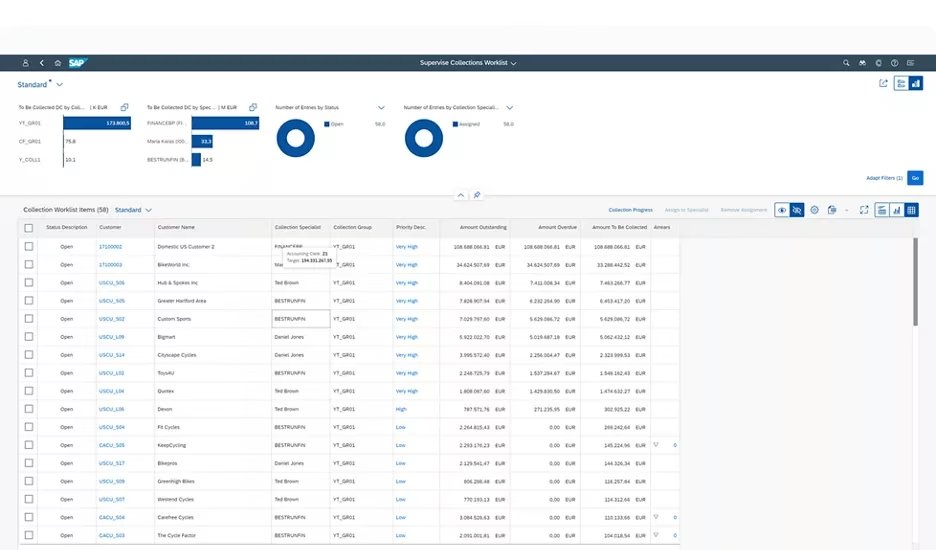
- SAP S/4HANA: the financial apps match incoming bank statement items with open receivables by the rules you define, and unmatched items go to post-processing by a person; SAP Cash Application proposals appear in the Reprocess Bank Statement Items app (SAP Learning, as above). More: AI agents and SAP.
- Oracle Fusion Cloud: a receipt left unapplied gets ranked recommendations, each with a reason code such as Below transaction threshold (Oracle, release 26B, 2026).
- NetSuite: Intelligent Transaction Matching “runs reconciliation rules to automatically match imported lines to corresponding transactions”, and a user matches the exceptions (Oracle NetSuite Help Center). More: AI agents with Oracle and NetSuite.
- Dynamics 365 Finance: matching rules with the action “Settle customer invoice” settle invoices from bank lines; the rest sits on the Unmatched transactions tab (Microsoft Learn, 2026).
Rules and models work on records the ERP holds. A remittance email listing 40 invoices, a portal claim or a voicemail promising payment on Friday must reach the record first: that is where an AR layer starts.
Where is the handoff in cash application?
In cash application, the ERP clears what its rules match; the AR layer reads the remittance, investigates the items in the review queue and proposes the clearing for approval.
The ERP keeps bank statement import, its rules and models, the open-item ledger and the clearing posting; its rules keep running. DocSense reads remittances from email, PDF and portals with over 97% extraction accuracy across 100+ document types and 170+ languages, with zero template configuration. ClearMatch reaches a 95% auto-match rate with 100% posting validation (Transformance customer data, 2026). Mechanics: how AI reads remittance advice.
For a payment that stays open, Vero, the Transformance agent, investigates from Customer 360, one graph per customer, fetches internal and external information to find more matches and proposes the clearing with its evidence. A person approves; nothing posts without human sign-off.
Illustrative example (figures are fictional). A customer pays USD 184,320.00 with the note “OCT PAYMENT” and sends the invoice list as a PDF. No rule finds a reference, so the line waits in the queue. The PDF lists 40 invoices: 38 paid in full, one USD 412.50 short on a pricing line, one USD 3.18 short from the exchange rate. Vero proposes the clearing with a residual item and reason code for the short pay and a small-difference posting for the FX amount. A person approves; the ERP posts if the period is open. Posting mechanics: clearing open items from an external system.
Where is the handoff in short pays, deductions and disputes?
The ERP records a payment difference as a residual item, adjustment, credit memo or dispute; the AR layer identifies and classifies the deduction and assembles the evidence.
The ERP side:
- SAP S/4HANA: residual items and reason codes “to describe the reason for the payment difference” (SAP Learning, S/4HANA course); the link to SAP Dispute Management “automatically transmits payment reductions” as dispute cases (SAP Learning).
- Oracle Fusion Cloud: lockbox can “create adjustment entries for underpaid receipts” within an AutoCash tolerance (Oracle, 25D, 2025); Manage Disputes submits a dispute “to the credit memo approval process” (Oracle, 25D, 2025).
- NetSuite: payments applied to selected invoices, and credit memos applied “to decrease the amount a customer owes you” (Oracle NetSuite Help Center).
- Dynamics 365: the deduction workbench in Supply Chain Management can “match deductions to open credit transactions, split deductions, deny deductions” against a rebate agreement (Microsoft Learn, 2025).
ClaimIQ identifies deductions with 97% accuracy and classifies each into six categories in under 15 seconds, against 45 minutes by hand. About 40% of trade deductions are auto-validated by rules (Transformance customer data, 2026).
The promotion agreement sits with sales, the proof of delivery with logistics, the remittance in the AR inbox. Vero gathers them on Customer 360 and proposes to settle or dispute; a person approves every settlement, dispute and write-off. The outcome goes back as the ERP’s own clearing, credit memo or journal entry. See where customer deductions come from and AI dispute management in AR.
Where is the handoff in AR collections and dunning?
The ERP decides which customer is due for which dunning level or strategy step; the AR layer works the contact by email and phone and records promises and outcomes.
The ERP side:
- SAP S/4HANA: the dunning run “creates a dunning proposal which you can edit, delete, and re-create”, with up to nine dunning levels per procedure (SAP Learning); SAP Collections Management ranks past-due customers into a worklist by your collection strategy (SAP Learning, receivables management course).
- Oracle Fusion Cloud: Advanced Collections sends dunning letters “via email, fax or print” (Oracle, 26A, 2026) and applies strategies “based on each customer’s collection risk score” (Oracle, 26C, 2026).
- NetSuite: the Dunning Letters SuiteApp escalates by dunning level, and “you can pause dunning to deal with a customer’s queries regarding an invoice” (Oracle NetSuite Help Center).
- Dynamics 365 Finance: collections process automation “schedules activities, sends email messages, and creates and posts customer collection letters” (Microsoft Learn, 2026); an optional Copilot summary drafts reminder emails for you to review (Microsoft Learn, 2026).
CollectPulse actions 100% of overdue invoices within 24 hours, where manual teams reach 30-40%, and Vero handles 60-80% of routine touches. The AI calling agent makes 15-20 calls an hour, against 15-20 a day for a human collector, in 70+ languages, and identifies itself as AI at the start of every call. DSO comes down 8-12 days on average (Transformance customer data, 2026).
Promise-to-pay capture is 3x manual. Promises and call outcomes land on Customer 360; which go back to the ERP as updates is agreed per project (how AI tracks promises to pay).
Which steps of the order-to-cash process stay in the ERP?
The ledger, invoicing, credit limits and order blocks, period control and the posting itself stay in the ERP; the AR layer writes clearings, journal entries and updates back after approval.
The handoff per step: what stays in the ERP, what the AR layer adds, who approves
Transformance reads customer master data, open items, invoices, journal entries, bank statements and remittances, and writes clearing postings, journal entries and ERP updates, including reversals. On SAP, it needs no custom ABAP and no modification. Field by field: what AR automation reads from and writes to the ERP.
Control sits in a 4-level approval model (read, recommend, execute, post) with thresholds by amount, entity and customer; admins configure rules, finance approves, and the audit log records who approved what. Details: who approves what, the audit trail and how AI agents access ERP data safely.
How do you draw the line for your own ERP?
Map each step to the function your ERP edition documents and you configured, measure what is still waiting for a person after its rules have run, then hand those items and the customer contact to the layer.
How to draw the line between your ERP and an AR automation layer in 6 steps:
- List your order-to-cash steps per entity: credit check, invoicing, cash application, short pays and deductions, disputes, AR collections, cash forecasting.
- Note for each step the function your ERP edition documents and that you have licensed and configured.
- Measure for four weeks what each function hands to a person: queued bank lines, residual items and unapplied cash, dunning proposals users edit before release, disputes without a reason code.
- Ask three questions per step: does the input arrive from outside the ERP, does it need evidence from elsewhere, does it need a customer conversation?
- Hand the open items and the customer contact to the AR layer; keep the rules, the ledger and the posting in the ERP.
- Set approval thresholds by amount, entity and customer before the first write-back, and review them after the first month.
Step 4 is our guidance, not a benchmark: three no’s leave the step to the ERP’s rules. A USD 9,400 short pay quoting a portal promotion number is two yeses.
Cash application alone is a complete scope; deductions, AR collections and cash forecasting can follow later. The rollout order, step by step: the enterprise ERP order-to-cash playbook.
What changes when a group runs more than one ERP?
With several ERPs, each keeps its own rules and postings, while one AR layer holds every customer’s history across them, so a payer that pays several entities is worked once.
A group on SAP S/4HANA at headquarters and NetSuite in a US subsidiary runs two dunning logics and two review queues for shared customers. Transformance consolidates multiple SAP instances and company codes, NetSuite subsidiaries and Dynamics 365 legal entities in one environment. Vero works on one Customer 360 graph per customer, and each posting goes back to the entity that owns the open item (order-to-cash across legal entities).
The ERP connection typically takes 2-3 days, and your IT team may be involved; the full rollout takes 4-8 weeks, with a proof of value in 4-5 weeks on one entity (implementation time). Per ERP: SAP S/4HANA, NetSuite, Dynamics 365 Finance & Operations, Oracle (supported).
Who Transformance is for
- ERPs: SAP S/4HANA (on-premises, private cloud, public cloud), SAP ECC, NetSuite, Microsoft Dynamics 365 Finance & Operations and Business Central, and Odoo in production with customers; Oracle and Infor supported.
- Size: mid-market to large enterprise, 250 to 2,000+ employees, including groups with several entities and shared service centres.
- Payment volume: from under 1,000 to over 100,000 payments a month.
- Industries: manufacturing, consumer goods and food and beverage, logistics, e-commerce, agriculture, energy and professional services.
- Scope: cash application alone, or the full order-to-cash (cash application, deductions, AR collections, cash forecasting).
Conclusion: let the ERP keep the rules, add the layer where work leaves them
SAP, Oracle, NetSuite and Dynamics 365 document a function for every order-to-cash step; an AR layer adds work at the review queue, on outside inputs and in the customer conversation.
Keep the ledger, credit decisions and the posting in the ERP; give the layer the remittances, deductions and calls, with a person approving what goes back.
Key terms
- Order-to-cash: the process from customer order to payment received and settled with the invoice.
- Cash application: matching incoming payments to open invoices and clearing them in the ERP.
- Remittance advice: the customer’s list of what a payment pays, often sent apart from it.
- Short pay: a payment below the invoice amount, which leaves a difference to explain.
- Dunning: escalating payment reminders sent by dunning level as invoices age.
- Dispute management: recording, investigating and resolving a customer’s objection to an invoice.
Related guides
- Which ERP systems does Transformance integrate with?
- What data does AR automation read from and write to the ERP?
- How do external systems post payments and clear open items?
- Who approves what when an AI agent works in your ERP?
- What does an AI agent’s audit trail in finance record?
- How do AI agents work with SAP for accounts receivable?
Frequently Asked Questions
Does SAP S/4HANA cover the whole order-to-cash process?
SAP documents a standard function for every order-to-cash step, from SAP Credit Management and billing to dunning, SAP Collections Management, SAP Dispute Management and SAP Cash Management; your edition, licences and configuration decide which you use.
Which ERPs does Transformance work with?
Transformance runs in production with customers on SAP S/4HANA (on-premises, private and public cloud), SAP ECC, NetSuite, Microsoft Dynamics 365 Finance & Operations and Business Central, and Odoo, and it supports Oracle and Infor.
Do we have to change our ERP to add an AR automation layer?
No: the ERP stays the system of record with its rules, ledger and postings, and on SAP no custom ABAP or modification is needed. The connection typically takes 2-3 days; your IT team may be involved.
Is Transformance built for a company of our size and payment volume?
Transformance is built for mid-market to large enterprises with 250 to 2,000+ employees, including multi-entity groups, processing from under 1,000 to over 100,000 payments a month.
Can we start with cash application and keep the rest in the ERP?
Yes: cash application alone is a complete scope, and deductions, AR collections and cash forecasting can follow later, while dunning, credit decisions and the posting stay in your ERP.
How long does it take to add AR automation next to the ERP?
The ERP connection typically takes 2-3 days, the full rollout takes 4-8 weeks, and a proof of value runs in 4-5 weeks on one entity.
What does an AR automation layer from Transformance cost?
Cost depends on scope and the number of entities, from cash application alone to the full order-to-cash. Book a Call for a figure for your setup.
SAP, SAP S/4HANA, Microsoft, Dynamics 365, Business Central, Oracle, NetSuite, Odoo and Infor are trademarks of their respective owners (SAP SE, Microsoft Corporation, Oracle Corporation, Odoo S.A., Infor). Transformance is not affiliated with or endorsed by them.


