




Key Takeaways
- One AR process is one rulebook, one customer view, one worklist and one set of KPI definitions; each entity’s ERP keeps its own books.
- Among 198 DSAG member companies in the DACH region, the four SAP-generation shares sum to 132% (our arithmetic), so many run more than one SAP generation (DSAG, 2026).
- Harmonise reason codes, tolerances, dunning stages, KPI definitions and approval thresholds; keep payment terms, legal texts, banks and close calendars local.
- When one USD 48,000 payment covers invoices in SAP and NetSuite, your team splits it by the remittance, and each ERP clears its own invoices after a person approves.
- Transformance connects to SAP and NetSuite (in production with customers) and Oracle (supported); each connection typically takes 2-3 days, and your IT team may be involved.
In This Article
- Key Takeaways
- How do you run one AR process across SAP, Oracle and NetSuite?
- What stays in each ERP?
- What does the shared AR layer hold?
- Which AR rules should the group harmonise, and which stay local?
- What happens when one payment covers invoices in two ERPs?
- Who owns what when AR runs across several ERPs?
- Which KPIs show that one AR process works across ERPs?
- Do you need ERP consolidation before you unify AR?
How do you run one AR process across SAP, Oracle and NetSuite?
Leave the books in each ERP and share everything else: one customer view, one rulebook, one worklist and one set of KPIs above SAP, Oracle and NetSuite.
One AR process across SAP, Oracle and NetSuite: what stays where, and who owns it
ERP terms are the ERP vendors’ own. The ERP of each entity is the system of record; the shared AR layer is a role in your operating model that reads, proposes and keeps the work state, and writes to the ERP only after a person approves.
One AR process is one policy, one customer view, one worklist and one set of KPI definitions for every entity, whatever ERP it runs. It is not one ERP and not one database.
SAP estates alone are mixed: in the DSAG Investment Report 2026, 198 member companies of the German-speaking SAP user group named the SAP systems they use: S/4HANA on-premises (56%), SAP ECC or the older Business Suite (54%), S/4HANA Private Cloud (17%) and S/4HANA Public Cloud (5%) (DSAG, 2026). The four shares sum to 132%. That sum is our arithmetic, not a DSAG figure, and it implies that many respondents run more than one SAP generation at once.
Add a NetSuite subsidiary from an acquisition and an Oracle division, and one customer sits in three ledgers. The parent on one ERP and subsidiaries on another is what finance-systems teams call two-tier ERP.
What stays in each ERP?
Each ERP keeps its entities’ ledger, customer accounts, open items, postings and period close, because each entity’s statutory books live there.
SAP S/4HANA and ECC. The company code is “the smallest organizational unit of external accounting for which a complete, self-contained set of G/L accounts can be created”, and statutory financial statements are drawn per company code (SAP Learning, accessed 2026). A company code is usually one legal entity; SAP’s training example maps a German company to 1010 and a US company to 1710. Clearing, residual items, dunning and posting periods run per company code. See SAP S/4HANA integration.
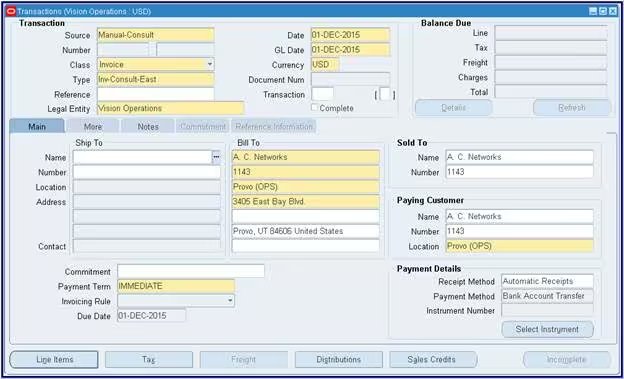
Oracle Fusion and E-Business Suite. In Fusion Receivables, the business unit runs receivables work and the ledger holds the books. Reference data can be shared across business units or kept within one, but customer sites and customer account relationships must sit in business-unit-specific reference data sets (Oracle Help Center, 2025). E-Business Suite uses operating units. See connecting to Oracle Fusion and EBS.
NetSuite OneWorld. Each entity is a subsidiary. With the Multi-Subsidiary Customer feature, one customer record is shared with several subsidiaries; the primary subsidiary “is generally associated with any transactions involving that customer”, and a secondary one can be chosen on a transaction (NetSuite help, 2026). See NetSuite and OneWorld integration.
In Dynamics 365 Finance & Operations, the legal entity plays this role, and the global address book lets one organisation be a customer in one legal entity and hold other roles in another (Microsoft Learn, 2026).
So clearing, residual items, write-offs and period close stay entity decisions in that entity’s ERP. Design the shared layer so it never posts into a closed period or moves an item between entities on its own; no invoice gets copied from one ERP into another.
What does the shared AR layer hold?
The shared AR layer holds the customer view across entities, remittances and bank data as they arrive, the worklist, proposals with evidence, and the approvals and audit log.
The shared AR layer is a role in your operating model; the paragraphs below mark what Transformance does in it.
The customer view. A cross-reference links each customer’s numbers per ERP: the business partner in SAP, the customer account in Oracle, the customer record in NetSuite. Your master data team maintains it, so a parent group buying from four of your entities can be worked as one account; each ERP keeps its own master record.
Inputs that never reach the ERP. Remittances arrive in email bodies, PDFs and portals. DocSense from Transformance reads them with over 97% extraction accuracy across 100+ document types and 170+ languages, with no templates. For bank statements, see how BAI2, CAMT.053 and MT940 files feed cash application.
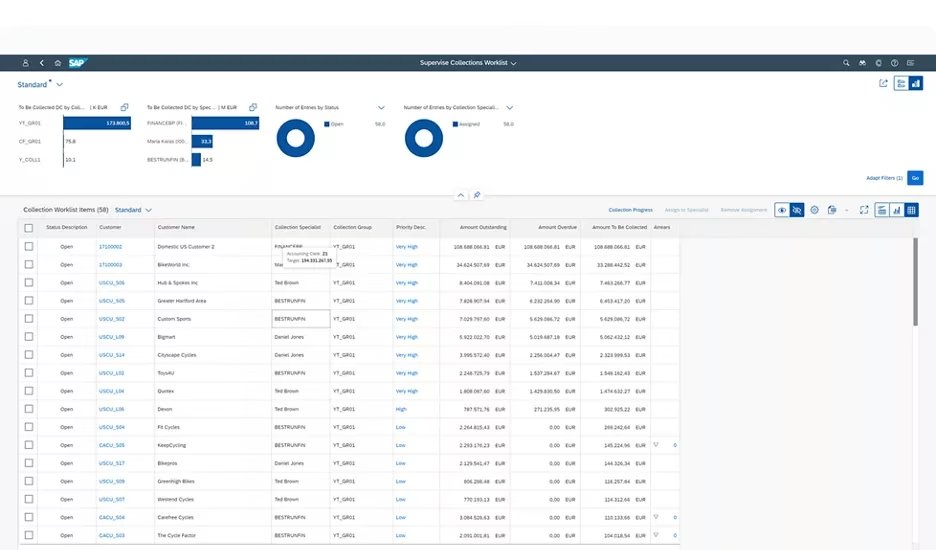
Work the ledgers do not record. Promises to pay, dispute and deduction cases and AR collections notes have no home in a ledger. Vero, the AI agent, works on Customer 360, one graph per customer that serves as its working memory.
Entities in one environment. Per ERP, multiple SAP instances and company codes, NetSuite subsidiaries or Dynamics 365 legal entities consolidate in one Transformance environment. Oracle is supported. The status per ERP is in which ERP systems Transformance integrates with.
What the layer does not hold is the ledger. Every write, whether a clearing posting, a journal entry or an ERP update including a reversal, goes to the entity’s own ERP after a person approves. ClearMatch validates 100% of postings, and nothing posts without human sign-off. The field-by-field map is in what AR automation reads from and writes to the ERP.
Which AR rules should the group harmonise, and which stay local?
Harmonise the rules that decide how AR work is done, such as reason codes, tolerances, dunning stages and KPI definitions; keep contracts, legal texts, banks and close calendars local.
Harmonise (one group list each):
- Payment-difference reason codes, mapped to the codes each ERP uses.
- Short-pay tolerances and write-off limits, set per entity.
- Dunning stages and timing by customer segment.
- Dispute and deduction categories.
- KPI definitions, down to the calculation method.
- Approval thresholds by amount, entity and customer.
Keep local:
- Payment terms in each customer contract.
- Legal wording on dunning letters and statutory late-payment interest.
- Tax, currencies and bank accounts per entity.
- Posting periods, close calendars and the language of customer letters.
Our rule of thumb: a rule belongs to the group if two entities applying it differently would change a KPI the CFO compares across entities.
One group AR process owner maintains the list; each entity controller signs off the local values. Reason codes are a good first item, because a short pay coded “pricing” in one ERP and “other” in another hides the pattern from everyone. Multi-currency dunning is covered in running AR across legal entities.
What happens when one payment covers invoices in two ERPs?
Each ERP clears its own invoices: the remittance shows how the payment splits per ERP, the short pay follows the group rule, and a person approves before anything posts.
Illustrative example (figures are fictional), worked by your team. A customer buys from your US company code 1710 on SAP, with invoices of USD 18,400 and USD 11,600, and from a NetSuite subsidiary, with one invoice of USD 18,250. It sends one USD 48,000 wire to the SAP entity’s bank account, with a remittance listing all three. The open total is USD 48,250, so the payment is USD 250 short.
- Read the remittance and the bank line: three invoice numbers, one amount.
- Find the invoices through your customer cross-reference: two in company code 1710, one in the NetSuite subsidiary.
- Split the payment by the remittance: USD 30,000 against the two SAP open items, USD 18,000 against the NetSuite invoice.
- Apply the group rule to the USD 250 short pay: a group reason code and a residual on the NetSuite invoice, or a write-off if it is under the tolerance that subsidiary’s controller set.
- Approve: a person signs off the split and the USD 250.
- Let each ERP record its own side: SAP clears the two open items in 1710, and the NetSuite subsidiary applies a payment to its invoice once the intercompany settlement below is booked.
The cash sits in the SAP entity’s bank account, so the subsidiary’s USD 18,000 needs an intercompany settlement under your group’s policy, typically an intercompany account in SAP and an intercompany journal entry in NetSuite OneWorld. More in how cash application handles intercompany and multi-currency payments.
For any unmatched or partly matched payment, Vero investigates from Customer 360, fetches internal and external information to find more matches and proposes with the evidence attached. A person approves within thresholds by amount, entity and customer. The posting mechanics are in how external systems post payments and clear open items.
Who owns what when AR runs across several ERPs?
The group AR process owner owns the rules, the shared service centre owns the daily work, entity controllers own their books, and each ERP owner owns access and configuration.
- Group AR process owner: the rulebook, KPI definitions and the reason-code list.
- Shared service centre or central AR team: matching, AR collections and the dispute worklist.
- Entity controller: the books, period close, write-offs above the local limit and the local rule values.
- ERP owner or IT, per ERP: the integration user, read and write rights per entity, change control.
- Master data team: the customer cross-reference.
- Finance approvers: sign-off by threshold.
Transformance supports this split of duties with a multi-level approval model (read, recommend, execute, post), thresholds by amount, entity and customer, and roles that separate who configures rules (admins) from who approves (finance). The setup is in who approves what when an AI agent works in your ERP.
Its audit log stores six things for every action: the timestamp, what the system did, what the user did, who approved, the input and the confidence. More in what an AI agent’s audit trail records.
Keep one control in your own policy: whoever writes a matching or tolerance rule does not approve the postings it produces. Document it per ERP, because each ERP owner grants rights separately.
Which KPIs show that one AR process works across ERPs?
Use one definition per KPI in every ERP and report it per entity and for the group: DSO, auto-match rate, unapplied cash age, overdue items actioned and dispute cycle time.
- DSO: one calculation method in every entity.
- Auto-match rate: the share of payments matched without manual work.
- Unapplied and on-account cash age: how long received cash waits to be applied.
- Overdue items actioned: the share of overdue invoices with an action within 24 hours.
- Dispute cycle time: days from opening a case to resolving it.
- Cross-entity payments: the share of payments touching more than one entity, visible only at group level.
The definition matters more than the target: if the SAP entities calculate DSO with the countback method and the NetSuite subsidiary uses a simple 90-day average, the group figure blends two measures that no entity can explain. The policy side is in one DSO method across entities.
For a baseline: ClearMatch reaches a 95% auto-match rate and runs end to end in under 8 minutes (Transformance customer data, 2026). CollectPulse actions 100% of overdue invoices within 24 hours, where manual teams reach 30-40% (Transformance customer data, 2026). DSO falls by 8-12 days on average (Transformance customer data, 2026).
Do you need ERP consolidation before you unify AR?
No: one AR process needs one rulebook and one customer view, not one ERP, so you can unify AR while each entity keeps the ERP it runs.
ERP consolidation is a separate, longer decision with its own business case. Tying AR to it makes AR wait for the slowest migration in the group.
A rollout order that works:
- Prepare: you map customers in the cross-reference and set the group rules.
- Prove: connect the first ERP and take one entity live. A proof of value takes 4-5 weeks on one entity.
- Extend: connect the next ERP and compare KPIs across entities. Each ERP connection typically takes 2-3 days, and your IT team may be involved.
A full rollout takes up to 4-8 weeks. SAP S/4HANA, SAP ECC and NetSuite are in production with customers; Oracle is supported. Because ECC is in production, AR does not wait for the S/4HANA move: see automate AR before or after the S/4HANA migration and the SAP ECC 2027 playbook for AR and finance. The module-by-module view is in the enterprise ERP order-to-cash playbook.
Who Transformance is for
- ERPs: groups running SAP S/4HANA or SAP ECC, NetSuite (including OneWorld subsidiaries), Microsoft Dynamics 365 Finance & Operations and Business Central, and Odoo in production with customers; Oracle and Infor supported.
- Size: mid-market to large enterprise, 250 to 2,000+ employees, including groups with several entities and shared service centres.
- Payment volume: from under 1,000 to over 100,000 payments a month.
- Industries: manufacturing, consumer goods and food and beverage, logistics, e-commerce, agriculture, energy and professional services.
- Scope: cash application alone, or the full order-to-cash (cash application, deductions, AR collections, cash forecasting).
Conclusion: one rulebook above the ledgers
One AR process across SAP, Oracle and NetSuite is an operating-model decision: the ERPs keep the books, the group owns the rules, and the shared layer holds the work.
Start with the cross-reference and the rulebook, then prove it on one entity. Transformance works with customers such as Syngenta, Eberspächer and PwC, across Europe, the United States and Australasia.
Key terms
- Order-to-cash: the process from customer order to cash received and applied, in every entity.
- Sub-ledger: the customer ledger in each ERP, where open items sit per entity.
- Master data management: keeping customer records consistent; here, the cross-reference of one customer’s numbers in each ERP.
- Payment terms: the agreed due date and discount rules in each customer contract, kept local per entity.
- On-account cash: payments received but not yet applied to invoices; their age is a group KPI.
- Days sales outstanding: the average number of days to collect, calculated one way in every entity.
Related guides
- Which ERP systems does Transformance integrate with?
- What data does AR automation read from and write to the ERP?
- How does Transformance integrate with NetSuite and OneWorld?
- How does Transformance connect to Oracle Fusion and EBS?
- Who approves what when an AI agent works in your ERP?
- Multi-entity order-to-cash: running AR across 40 legal entities
- Enterprise ERP order-to-cash playbook
Frequently Asked Questions
Do you need one ERP to run one AR process?
No. One AR process needs one rulebook, one customer view and one set of KPIs, while each entity’s ERP stays the system of record for its books.
Which ERPs does Transformance connect to in a multi-ERP group?
Transformance connects to SAP S/4HANA, SAP ECC, NetSuite including OneWorld, Microsoft Dynamics 365 Finance & Operations and Business Central, and Odoo, all in production with customers, and supports Oracle and Infor.
Can Transformance handle several SAP company codes or NetSuite subsidiaries?
Yes. Per ERP, multiple SAP instances and company codes, NetSuite subsidiaries or Dynamics 365 legal entities consolidate in one Transformance environment. Oracle is supported.
How long does it take to connect each ERP?
An ERP connection typically takes 2-3 days, and your IT team may be involved. A proof of value runs 4-5 weeks on one entity, and the full rollout takes up to 4-8 weeks.
What payment volume is Transformance built for?
Transformance is built for groups with from under 1,000 to over 100,000 payments a month across their entities.
Who owns the customer master when a customer exists in several ERPs?
Each ERP keeps its own customer record, and a master data team owns the cross-reference that links the customer’s numbers in SAP, Oracle and NetSuite.
What does it cost to run AR across several ERPs with Transformance?
The cost depends on scope and the number of entities, from cash application alone to the full order-to-cash. Book a Call and we size it with you.
SAP, SAP S/4HANA, Microsoft, Dynamics 365, Business Central, Oracle, NetSuite, Odoo and Infor are trademarks of their respective owners (SAP SE, Microsoft Corporation, Oracle Corporation, Odoo S.A., Infor). Transformance is not affiliated with or endorsed by them.


