Key Takeaways
- SAP and Oracle document rules that clear payments with a readable reference or a difference inside tolerance; both leave the rest for a person.
- In SAP’s own tolerance example, the automatic unauthorized deduction is 100 currency units on an open amount of 100,000 and 20 on 1,000.
- SAP documents SAP Cash Application, a machine-learning service that can post automatically when a proposal reaches a configured confidence threshold.
- Oracle E-Business Suite marks a receipt Unapplied or On-Account when no AutoCash rule applies; Oracle Fusion lists scored recommendations with a reason code.
- Transformance works what the rules leave open: Vero proposes with evidence, and a person approves.
In This Article
- Key Takeaways
- Which payments does rule-based cash application clear, and which need an AI proposal?
- How does SAP’s standard rule-based matching work?
- How do Oracle’s AutoCash rule sets and AutoMatch rules apply a receipt?
- What do SAP and Oracle document for machine-learning and score-based proposals?
- What happens to partial payments, short pays and deductions?
- What happens with missing remittance, unknown payers and foreign-currency payments?
- How does an AI proposal with human approval sit next to the ERP rules?
- How do you decide which payments stay with rules and which go to proposals?
Which payments does rule-based cash application clear, and which need an AI proposal?
Rules clear payments that carry a reference the ERP can read; an AI proposal handles the ones where the evidence sits elsewhere, and a person approves before anything posts.
Seven payment scenarios: what the documented rule does, and what an AI proposal with approval adds
Behaviour as documented by SAP and Oracle for the editions and releases cited below; your configuration decides what runs. In the last column, a person approves every proposal before anything posts.
Rule-based cash application is matching in which configured conditions, such as a reference, an amount or a tolerance, decide which open items a payment clears. An AI proposal is a suggested match with its evidence that a person approves before the ERP posts it.
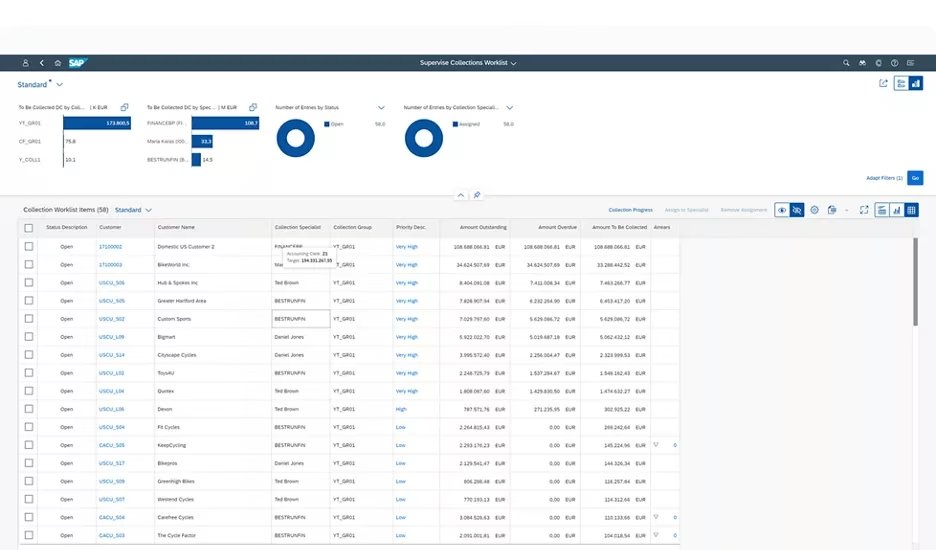
How does SAP’s standard rule-based matching work?
SAP imports the electronic bank statement, processes each item with posting and processing rules, reads the note to payee with an interpretation algorithm and clears the open items it finds.
Interpretation algorithm. SAP’s help page for an older release says it “determines how the information in the note to payee fields is to be interpreted by the system”, for example as a document number (SAP Help Portal, older release). SAP’s note adds that a document can only be found if the bank line carries it “in exactly the same form and with exactly the same number of characters as it is managed in the system”; its example is a reference stored with leading zeros.
Rules, then post-processing. In SAP’s lesson on SAP Cash Application, an SAP S/4HANA Cloud course, financial apps “automatically match most incoming bank statements with open receivables based on defined rules and leave unmatched bank statements for manual post-processing” (SAP Learning). SAP’s Reprocess Bank Statement Items app is where a person processes items further until clearing; it is covered below.
Tolerances. SAP compares a payment difference with the employee’s and the customer’s tolerance groups. “The payment difference must be within both tolerances to be handled automatically”; it then posts as a cash discount adjustment or an unauthorized deduction, and beyond the limit “you must manually process it” (SAP Learning).
SAP’s example makes the scale concrete: the lower of the two tolerances applies, so the automatic unauthorized deduction is capped at 20 currency units on an open amount of 1,000 and at 100 on 100,000. Beyond that, a person posts a partial payment, a residual item, a posting to another account with a reason code, or a write-off.
The note to payee comes from the bank file; for an agent beside these rules, see how AI agents work with SAP.
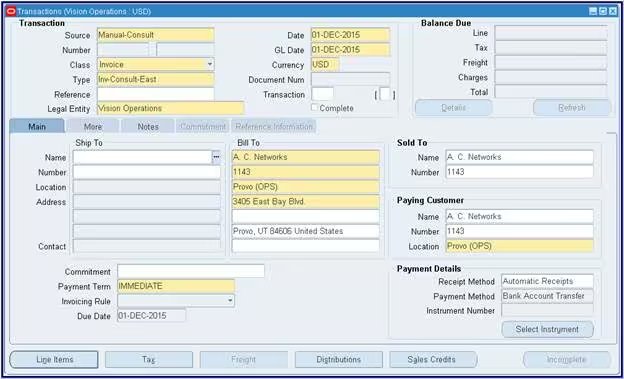
How do Oracle’s AutoCash rule sets and AutoMatch rules apply a receipt?
Oracle applies a receipt by configured rules: AutoCash rule sets in E-Business Suite, and in Fusion the Match Receipts By rule, AutoMatch thresholds and an application exception rule set.
E-Business Suite. The Oracle Receivables Implementation Guide, Release 12.2, lists five AutoCash rules: Apply to the Oldest Invoice First, Clear the Account, Clear Past Due Invoices, Clear Past Due Invoices Grouped by Payment Term, and Match Payment with Invoice (Oracle documentation, Release 12.2). Post QuickCash works through them in sequence:
- Match Payment with Invoice applies the receipt to one invoice, debit memo or chargeback whose remaining amount is “exactly equal to the receipt amount”.
- Apply Partial Receipts, a check box, lets Apply to the Oldest Invoice First apply a receipt that does not close the item.
- Bank charges and a tolerance limit, if set up, are considered when the current rule finds no match (Oracle excepts Apply to the Oldest Invoice First).
- No rule applies: the remainder is marked Unapplied or placed On-Account, per the Remaining Remittance Amount setting.
Fusion. Receivables “matches the remittance reference on the receipt to transactions, based on the active Match Receipts By rule”. With an exact match, and if the AutoMatch threshold settings allow, it applies the receipt automatically. Without one, it lists recommendations “according to the AutoMatch thresholds”, closest reference score first, each with a reason code such as Below transaction threshold, and a user applies the receipt. “The active application exception rule set manages the handling of over and under payments” (Oracle documentation).
Fusion lockbox underpayments. Lockbox looks for an invoice equal to the receipt plus the AutoCash tolerance limit; Oracle’s setup example pairs an exception rule “Underpayment less than” 100 with the action Adjustment, for one business unit, one customer site and one currency (Oracle documentation).
See how Transformance connects to Oracle (supported) and how AI agents work with Oracle.
What do SAP and Oracle document for machine-learning and score-based proposals?
SAP documents SAP Cash Application, a machine-learning service that proposes matches from past manual actions and can post automatically when a proposal reaches a configured confidence threshold.
In SAP Learning’s words, “a model is trained with data from past manual actions”, and the Receivables Line-Item Matching service “provides proposals for matching receivables with incoming bank statement items” (SAP Learning). A reprocessing job picks up the items that posting and processing rules did not process. Two settings decide the outcome:
- Target Accuracy for Proposal: the confidence above which a proposal shows in the reprocessing app.
- Target Auto-Clear Accuracy: the threshold for automatic posting. SAP’s example sets it to 100%, which SAP explains as posting only if the system is “absolutely sure that the two items are a match”.
Availability depends on your SAP edition and licence; check with your SAP team. The module is explained in the SAP Cash Application guide.
Oracle’s Fusion pages cited above describe score-based recommendations with reason codes; for more, check Oracle’s documentation for your release.
What happens to partial payments, short pays and deductions?
SAP posts differences inside its tolerance groups automatically and leaves larger ones to manual posting; Oracle applies its exception rule set. A proposal adds the evidence behind the difference.
SAP’s tolerance groups and Oracle’s exception rules are set as amounts and percentages. The documents that explain a difference, such as the promotion agreement, the proof of delivery or the customer’s claim, sit outside those settings. Vero, the AI agent in Transformance, reads the remittance and the claim documents, identifies the short pay and proposes the clearing, the residual and the deduction category. ClaimIQ identifies deductions with 97% accuracy in six categories, in under 15 seconds per deduction against 45 minutes by hand (Transformance customer data, 2026).
Illustrative example (fictional amounts). A customer pays USD 48,200.00 against 12 open invoices totalling USD 49,350.00. The bank line says “promo 4471”; the remittance PDF arrives by email.
- Rule outcome. The USD 1,150.00 difference is above the 100-unit automatic deduction in SAP’s example, so a person posts it from post-processing; in Oracle, the configured exception rule set decides.
- Proposal. Vero reads the PDF and proposes 11 invoices cleared in full (USD 44,750.00), USD 3,450.00 applied to the twelfth invoice of USD 4,600.00, and a residual of USD 1,150.00 classified as a promotion deduction, with agreement 4471 attached.
- Approval. A person checks the evidence and approves; the ERP posts, and the residual stays open.
Process detail is in how to automate partial payments and deductions.
What happens with missing remittance, unknown payers and foreign-currency payments?
Where SAP or Oracle find no match, a person works the item: SAP post-processing, Oracle recommendations or Unapplied and On-Account. Rate differences post as configured.
Missing remittance. With no reference, the interpretation algorithm has nothing to read, and SAP leaves the item for post-processing; Oracle marks an unmatched amount Unapplied or On-Account, or lists recommendations. Vero investigates from Customer 360, one graph per customer with payment history, open items and deductions, and fetches internal and external information to find more matches.
DocSense reads remittances in any format with over 97% extraction accuracy across 100+ document types and 170+ languages, with zero template configuration (Transformance platform data, 2026). See how AI reads remittance advice.
Unknown payer. In SAP, a customer can carry an alternative payer at client or company code level, and existing customers can be entered as permitted payers in the master record (SAP Learning). Oracle’s EBS user guide documents that an unidentified receipt, one with no customer specified, gets its customer before it is applied (Oracle documentation, Release 12.2). A proposal names the likely payer and items with the evidence; a person confirms before anything posts.
Foreign currency. SAP notes that “exchange rate differences occur when clearing foreign currency open items due to rate fluctuations”; realized differences post to the accounts assigned in customizing (SAP Learning). Oracle Fusion sets the AutoCash tolerance amount per currency on the customer site profile; for EBS (Release 12.2), Oracle documents that when a lockbox transfers foreign-currency receipts and the bank file has no exchange rate type, you enter one. The proposal shows the rate used and the amounts.
How does an AI proposal with human approval sit next to the ERP rules?
The ERP rules keep running; Vero works the items they leave open, proposes with evidence, and a person approves before the ERP posts the clearing.
For what the rules leave open, Vero investigates and prepares a proposal with its evidence; a person approves, changes or rejects it. The ERP then posts the approved clearing and checks period, account and tolerance again (how an approved clearing is posted).
ClearMatch reaches a 95% auto-match rate and runs end to end in under 8 minutes, with 100% posting validation (Transformance customer data, 2026). Nothing posts without human sign-off.
Approvals. A four-level approval model (read, recommend, execute, post) sets thresholds by amount, entity and customer; admins configure the rules and finance approves.
ERP side. Whether SAP Cash Application, Oracle AutoCash or AutoMatch stay in use is your decision; Vero works the items they leave open. In SAP, Transformance needs no custom ABAP and no modification in your system (clean core for third-party cash application); Oracle is supported. The ERP connection typically takes 2-3 days, and your IT team may be involved; the full rollout takes up to 4-8 weeks.
How do you decide which payments stay with rules and which go to proposals?
Measure what your rules leave open for one month, sort it by cause, and send the causes that need a document or a conversation to proposals.
Five steps to split payments between rules and proposals (our guidance, not a benchmark):
- List what your rules clear today and at what share.
- Sort the remainder by the seven scenarios in the table above.
- Mark the scenarios that need a document or a conversation the ERP does not hold.
- Set approval thresholds by amount, entity and customer.
- Review a sample of approved exceptions every week.
The rollout steps are in how to automate cash application with AI, and the metric in touchless cash application.
Who Transformance is for
- ERPs: teams running cash application on SAP S/4HANA (on-premises, private or public cloud), SAP ECC, NetSuite (including OneWorld subsidiaries), Microsoft Dynamics 365 Finance & Operations and Business Central, or Odoo, all running in production with customers; Oracle and Infor are supported.
- Size: mid-market to large enterprise, 250 to 2,000+ employees, including groups with several entities and shared service centres.
- Payment volume: from under 1,000 to over 100,000 payments a month.
- Industries: manufacturing, consumer goods and food and beverage, logistics, e-commerce, agriculture, energy and professional services.
- Scope: cash application alone, or the full order-to-cash (cash application, deductions, AR collections, cash forecasting).
Conclusion: keep the rules, add a proposal where they stop
SAP and Oracle document rules that clear payments with a readable reference or a difference inside tolerance, and leave unmatched items open for a person. An AI proposal starts there and brings that person the evidence. Start with one month of open items in one entity, sorted by the seven scenarios.
Key terms
- Cash application: matching incoming payments to open invoices and posting the clearing.
- Remittance advice: the customer’s list of invoices and deductions a payment covers.
- Lockbox: a bank service that collects check payments and sends their remittance data as a file.
- Deduction management: finding, classifying and resolving the reasons customers pay less than invoiced.
- Short pay: a payment that is less than the invoiced amount.
Related guides
- Which ERP systems does Transformance integrate with?
- How do external systems post payments and clear open items?
- Where does ERP order-to-cash end and AR automation start?
- How do BAI2, camt.053 and MT940 files feed cash application?
- SAP Cash Application: a complete guide for finance teams
Frequently Asked Questions
What is the difference between rule-based and AI cash application?
Rule-based cash application clears a payment when configured conditions such as a readable reference, an amount or a tolerance are met; an AI proposal suggests a match with its evidence where they are not, and a person approves it.
Does SAP document AI for cash application?
Yes: SAP documents SAP Cash Application, a machine-learning service that proposes matches between bank statement items and open receivables from past manual actions. Availability and settings depend on your edition and licence; check with your SAP team.
How does Oracle AutoCash decide which invoice a receipt pays?
In Oracle E-Business Suite, an AutoCash rule set applies a receipt in a set order, for example Match Payment with Invoice or Apply to the Oldest Invoice First, and marks the remainder Unapplied or On-Account when no rule applies. In Fusion, the Match Receipts By rule and AutoMatch thresholds decide.
Is there a standard accuracy figure for cash application?
There is no universal figure, and this page does not compare the two approaches: results depend on remittance availability, data quality and the payment mix. Measure your own open remainder by scenario first.
Which ERPs and company sizes does this work for?
Transformance runs in production with customers on SAP S/4HANA, SAP ECC, NetSuite, Microsoft Dynamics 365 Finance & Operations, Business Central and Odoo, and supports Oracle and Infor. It is built for 250 to 2,000+ employees and from under 1,000 to over 100,000 payments a month.
How long does it take to add AI proposals next to our ERP rules?
The ERP connection typically takes 2-3 days, and your IT team may be involved; the full rollout takes up to 4-8 weeks (implementation timeline).
What does it cost to add an AI proposal layer?
Cost depends on scope and the number of entities, so there is no single figure here. Book a Call and we scope it with you.
SAP, SAP S/4HANA, Microsoft, Dynamics 365, Business Central, Oracle, NetSuite, Odoo and Infor are trademarks of their respective owners (SAP SE, Microsoft Corporation, Oracle Corporation, Odoo S.A., Infor). Transformance is not affiliated with or endorsed by them.